
A Practical Guide to SIEM to Cloud SIEM Migration
Moving a legacy Security Information and Event Management (SIEM) system to the cloud isn’t a simple upgrade; it’s a fundamental re-architecture of your security operations. While the promise of elastic scalability and AI-driven threat hunting is compelling, nearly 70% of these modernization projects underdeliver or fail outright. They collapse under the weight of mismanaged complexity, wildly unrealistic expectations, and a failure to treat the migration as a security engineering challenge rather than an IT infrastructure lift.
This guide dissects the common failure points and provides a decision framework for executing a SIEM to cloud SIEM migration that actually succeeds.
Why Most SIEM Migrations Fail (And How to Avoid It)
The push to migrate starts with friction from on-prem systems: crushing maintenance overhead, the inability to scale during a threat spike, and painfully slow analytic performance. Cloud SIEM appears to be the solution, offering a predictable OpEx model and advanced features.
But the path is littered with predictable failure points. To succeed, you must first accept what a modern SIEM is—a data analytics platform, not just a log bucket. Most failures trace back to three critical miscalculations:
- Underestimating Detection Logic Migration: Believing existing rules and parsers can be “lifted and shifted.” They cannot. This effort typically consumes 40-60% of the project timeline and requires a complete rewrite.
- Miscalculating Data Costs: Failing to model the variable costs of data ingestion and storage, leading to budget overruns of 200-300%.
- Ignoring Operational Overhaul: Treating the project as a tool swap instead of a complete redesign of Security Operations Center (SOC) workflows, resulting in a massive, immediate drop in efficiency post-launch.
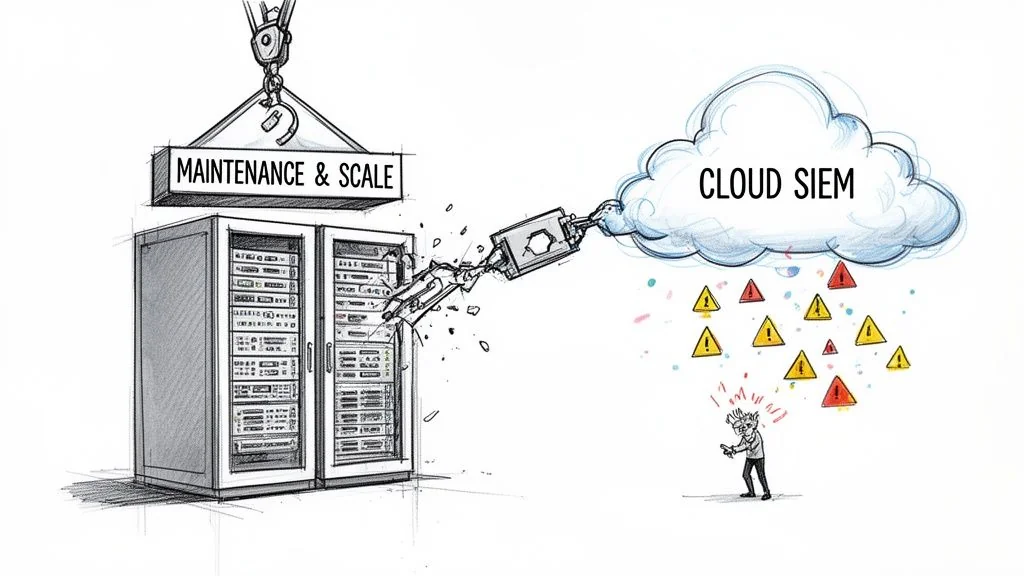
The Myth of “Lift-and-Shift”
The “lift-and-shift” mindset is the most common and guaranteed path to failure. Technical leaders convince themselves they can copy-paste existing rules, parsers, and workflows into the new cloud environment. This never works.
A SIEM to cloud SIEM migration is not about moving from a car to a different car; it’s about moving from a car to an airplane. You don’t ask where to put the gasoline. The entire operational model changes, requiring new skills and a complete rethinking of detection engineering.
This flawed assumption is the root cause of critical failures:
- Detection Rule Portability: Legacy correlation rules are deeply wired into the old system’s architecture. They do not translate directly to a cloud-native platform and require a full rewrite to function correctly—a process that can take months longer than planned.
- Data Parser Incompatibility: The custom parsers built over years to normalize proprietary log formats are incompatible with the new system. Rebuilding, testing, and validating them from scratch is a significant, often overlooked, engineering effort.
- Operational Workflow Disruption: A new platform forces a complete redesign of SOC analyst workflows, dashboards, and reporting. Without proactive planning, this leads to a massive, immediate drop in team efficiency on day one.
A cloud SIEM is not just a hosted version of an on-premise tool. It operates on entirely different principles of data handling, analytics, and automation. Recognizing this is the first step to avoiding project failure.
Analyzing the Real Cost of Cloud SIEM
The idea that cloud SIEM is automatically cheaper than on-prem is a dangerous myth. It’s an oversimplification that leads to budget blowouts and puts security modernization projects at risk. A true total cost of ownership (TCO) analysis must go beyond the vendor’s sticker price and confront the volatile, consumption-based reality of cloud security.
On-prem SIEM is a capital expenditure (CapEx) model—you buy the hardware, licenses, and rack space upfront. It is a large but predictable cost. Cloud SIEM flips that to an operational expenditure (OpEx) model that is notoriously difficult to forecast.
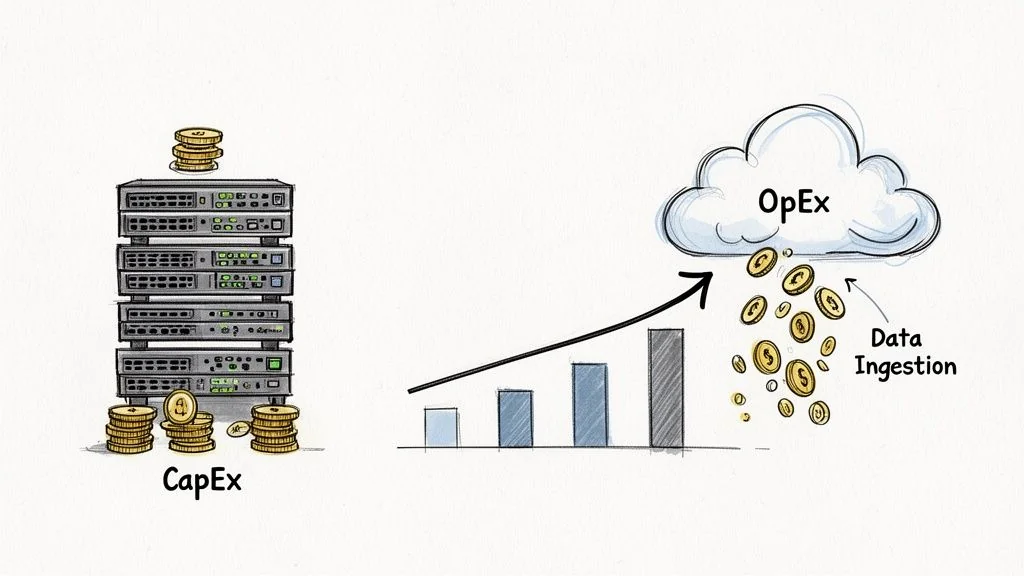
This model introduces two cost drivers that spiral out of control: data ingestion and data storage. Every log from every endpoint, server, and cloud service costs money to bring in, process, and retain. Without a rock-solid data filtering and retention strategy, these costs grow exponentially.
The New Premium for AI and Automation
The market has inverted. A few years ago, the cloud was the budget-friendly option. Today, cloud SIEM is the premium offering, and vendors charge top dollar for its advanced AI, automation, and threat-hunting capabilities. On-premise solutions are now often positioned as the more economical choice for organizations that need to process high volumes of log data for compliance.
This means the assumption that a SIEM to cloud SIEM migration saves money is dead. The real budget shock comes from using the very features that justified the move—powerful analytics and AI engines consume massive cloud resources, translating directly to a larger monthly bill.
The true cost of a cloud SIEM isn’t the base subscription; it’s the variable expense of actually using its best features at scale. Your invoice becomes a direct reflection of how active your security team is and how many threats they’re chasing down.
This creates a paradox: to get the value you paid for, you must use the platform’s most expensive features. CTOs and CISOs must build cost models based on realistic data volumes and projected usage of these premium tools, not on vendor sales decks.
On-Premise vs Cloud SIEM TCO Comparison
A true TCO analysis reveals how the cost burden shifts from upfront capital investments for on-premise solutions to ongoing, variable operational costs in the cloud. The table below breaks down the key financial drivers over a typical three-year period.
| Cost Component | On-Premise SIEM (3-Year TCO) | Cloud SIEM (3-Year TCO) | Key Consideration |
|---|---|---|---|
| Initial Investment | High (CapEx): Hardware, perpetual software licenses, data center setup. | Low (OpEx): Minimal setup fees, initial subscription costs. | The cloud model avoids a massive upfront cash outlay. |
| Recurring Licensing | Predictable: Annual maintenance and support contracts, typically 18-25% of license cost. | Variable: Subscription fees based on ingestion (GB/day), users, or compute resources. | Cloud costs can escalate unpredictably with data growth. |
| Infrastructure & Utilities | High & Ongoing: Power, cooling, physical security, rack space. | Zero: Included in the vendor’s subscription fee. | This hidden cost for on-prem accounts for 15-20% of hardware costs annually. |
| Personnel & Staffing | High: Dedicated engineers for hardware, OS, and SIEM application maintenance. | Lower: Vendor handles infrastructure management; team focuses on security operations. | On-prem requires specialized talent not focused on security outcomes. |
| Hardware Refresh Cycles | Recurring CapEx: Servers and storage replaced every 3-5 years. | Zero: Vendor manages all hardware lifecycles. | A major, recurring capital expense for on-prem is eliminated. |
| Disaster Recovery (DR) | Very High: Cost of building and maintaining a full-scale redundant DR site. | Included/Add-on: Managed by the vendor with built-in geo-redundancy. | Architecting a proper DR environment for an on-prem SIEM can nearly double the infrastructure cost. |
| Scalability & Performance | Limited & Costly: Scaling requires purchasing new hardware and lengthy provisioning. | Elastic & On-Demand: Scale up or down as needed, paying only for what you use. | The cloud’s primary advantage is flexibility, but this is also where costs become unpredictable. |
This comparison highlights the fundamental trade-off: on-premise SIEM offers cost predictability at the expense of high upfront investment and operational rigidity, while cloud SIEM provides flexibility but introduces the challenge of managing variable, consumption-based expenses.
Ultimately, the choice demands a disciplined TCO calculation. The cloud model shifts hardware and maintenance costs to the vendor but introduces its own variables. Understanding the hidden costs of break-fix IT is crucial; a reactive approach to managing cloud consumption is just as costly as waiting for on-prem hardware to fail.
Technical Landmines That Derail Migrations
A SIEM migration is won or lost in engineering execution. High-level strategy is meaningless if the technical team gets bogged down by the deeply-rooted complexities of the legacy system. This is where a single overlooked detail spirals into a massive security blind spot or a project-killing delay.
The most underestimated landmine is migrating custom detection logic. Most on-prem SIEMs are a decade-old patchwork of custom rules, tangled correlation logic, and hand-cranked data parsers. The idea that this logic can be “ported” is a fantasy. It must be rewritten from the ground up.
A legacy SIEM’s rule set isn’t portable code. It’s a collection of architectural decisions, tribal knowledge, and workarounds built for a specific platform. Trying to move those rules is like trying to run diesel in a jet engine. The underlying mechanics and data models are fundamentally incompatible.
This painful reality means a huge chunk of your migration timeline—often 40-60% of the total engineering effort—is dedicated to detection engineering. This is not a translation job; it is a ground-up re-architecture of your entire security monitoring capability.
Data Gravity and Historical Log Hoards
“Data gravity”—the inertia of petabytes of historical logs—is another classic failure point. Organizations often have years of archived logs on-prem. The business instinct is to insist this data must be migrated into the new cloud SIEM for compliance or long-term analysis. This is a terrible mistake.
The cost and time required to move that much data are staggering. Egress fees from your data center, ingress fees into the cloud, and a transfer process can take weeks or months. The correct approach is to archive historical data in cheap cloud object storage (Amazon S3 Glacier or Azure Blob Storage Archive Tier) and only migrate data needed for active threat hunting—typically the last 90 to 180 days.
- The Financial Hit: Moving just 1 PB of data can cost tens of thousands of dollars in network egress fees alone.
- The Operational Drag: The transfer itself can stretch for weeks or months, holding the entire project hostage.
- The Reality of Old Logs: Analysts almost never query data that is over a year old, making the cost of keeping it “hot” and searchable in a premium SIEM impossible to justify.
Decoupling active threat detection data from the deep historical archive de-risks the entire project and prevents massive cost overruns.
Proprietary Systems and the Latency Blind Spot
Legacy environments have homegrown applications that spit out non-standard logs. Your old SIEM has a library of custom-built parsers to make sense of this data. In a cloud SIEM, those parsers are useless. Each one must be rebuilt. Failing to map every oddball data source and budget time for parser development creates dangerous blind spots on day one.
A more subtle risk comes from network architecture: latency. On-prem, systems talk over fast LAN connections. Migrating to a cloud SIEM introduces network paths and delays in log delivery. This breaks real-time threat detection. A correlation rule built to spot a brute-force attack by catching five failed logins in one second will miss the attack if network lag causes those logs to arrive out of order or trickle in over 1.5 seconds.
How Latency Creates a Security Gap:
- On-Premise: An attacker tries five logins in 800 milliseconds. The logs hit the SIEM almost instantly, all within the detection window. An alert fires.
- Cloud Migration: The same attack happens. But due to network jitter, the five log events arrive scattered over a 1,500-millisecond span.
- The Result: The correlation rule’s one-second time window is missed. No alert is generated. The attacker gets in undetected.
Your technical team must test and recalibrate every time-sensitive detection rule to account for this new network reality. Ignoring it invites attackers to walk through the gaps created by your own migration.
A Migration Readiness Decision Framework
Jumping into a SIEM migration without an objective assessment of your organization’s readiness is a direct path to failure. This framework provides a structured way to evaluate your technical and operational capabilities before you commit. Scoring yourself against these four pillars gives you a clear go/no-go signal and a punch list of weaknesses to fix before you start.
The Four Pillars of Readiness
True readiness is a mix of technical maturity, team skills, and organizational discipline. A high score in one area cannot compensate for a critical failure in another. The goal is an honest understanding of your starting point.
This decision tree shows how common migration traps—like messy detection rules or bad data—can derail a project.
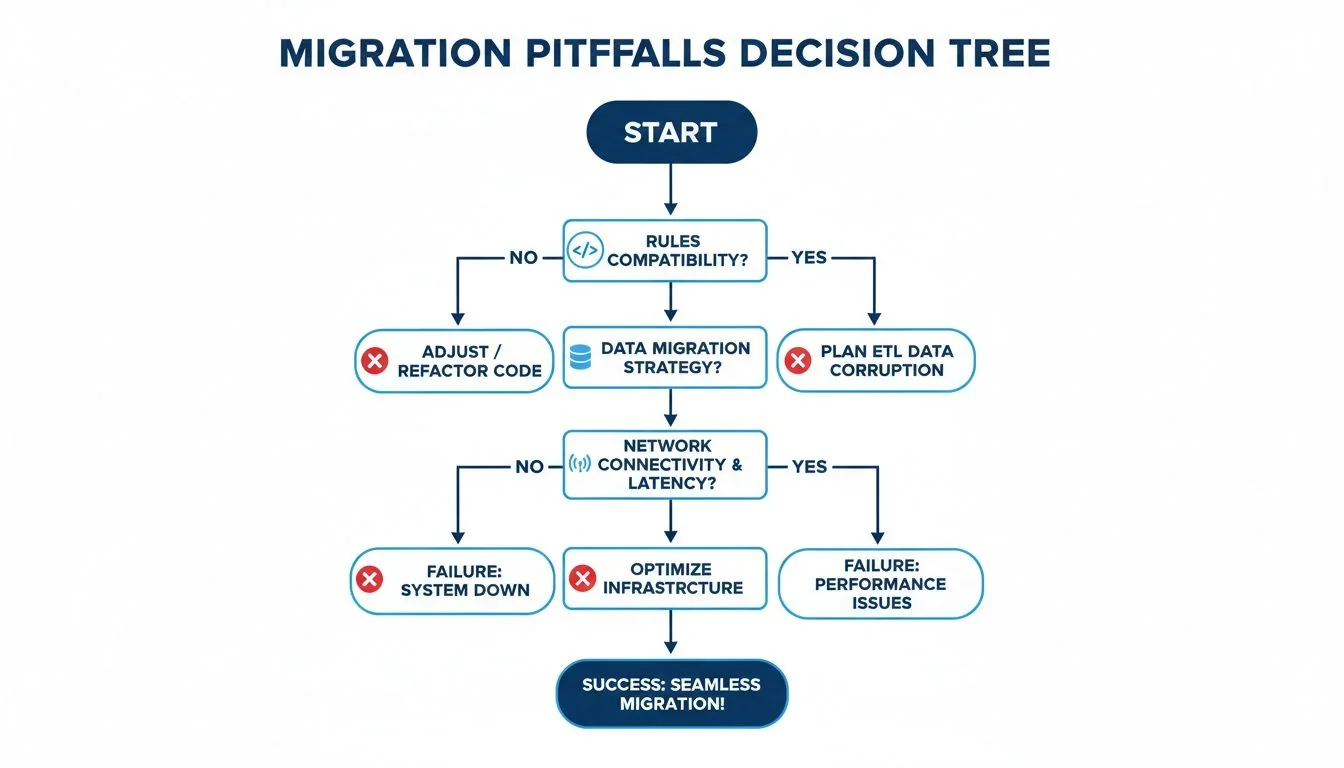
Failures in foundational areas like rule portability or data quality have a cascading effect. If not caught in a readiness check, they will kill your project later.
1. Data Source Maturity
This pillar is about the quality, consistency, and normalization of your log sources. Migrating messy, unparsed, or irrelevant data to a cloud SIEM doesn’t fix the problem; it just makes the problem more expensive.
- Log Normalization: Are logs already parsed into a consistent format (like CIM)? Or is your current SIEM a chaotic mix of raw data?
- Data Filtering: Do you have an aggressive filtering strategy to drop low-value logs at the source? A “collect everything” model is prohibitively expensive in the cloud.
- Source Inventory: Can you produce a complete inventory of all log sources, their owners, and their business purpose within 48 hours? If not, you are not ready.
2. Detection Logic Complexity
This pillar addresses the portability of your custom detection rules. The belief that you can copy-paste rules is the most damaging technical mistake.
- Rule Dependency: How many critical alerts depend on logic tied to your legacy SIEM’s proprietary architecture or query language?
- Custom Parser Volume: What percentage of your data sources rely on custom-built parsers? Each one is a mini-development project that must be rebuilt.
- Use Case Validation: When was the last time you validated that existing detection rules are still effective against current threats and not just generating noise?
3. Team Skillset and Cloud Proficiency
A cloud SIEM is a completely different operating model that requires new skills. Your team’s ability to adapt is a primary predictor of success.
A SIEM migration is less about technology and more about your team’s ability to unlearn old habits. If your analysts are not proficient in cloud architecture, API integration, and infrastructure-as-code principles, the advanced features of a cloud SIEM will remain unused and the project’s ROI will never be realized.
- Cloud Architecture: Does your security team have hands-on experience with the target cloud provider’s core services (IAM, networking, object storage)?
- Automation and APIs: Is your team capable of using APIs and scripting languages like Python to automate workflows and integrate tools?
- Threat Hunting Skills: Are your analysts trained for proactive, hypothesis-driven threat hunting? Cloud SIEMs are built for hunters, not just reactive alert responders.
4. Governance and Compliance
This pillar ensures the migration plan doesn’t crash into legal and regulatory requirements. Ignoring these constraints can stop a project dead in its tracks.
- Data Residency: Do you have strict data sovereignty requirements that dictate where logs can be stored and processed?
- Regulatory Mapping: Have you mapped every compliance control (PCI DSS, HIPAA, etc.) from your old SIEM to the specific features of the new one?
- Chain of Custody: Is your process for handling and exporting data for legal discovery clearly defined and tested for the new cloud environment?
Cloud SIEM Migration Readiness Checklist
Use this table to score your organization’s readiness. Be brutally honest. A low score is not a failure; it is a roadmap for the prep work needed before the migration begins.
| Assessment Pillar | Key Question | Readiness Criteria (1-5 Scale) | Mitigation Strategy |
|---|---|---|---|
| Data Source Maturity | How consistent and well-documented are our log sources? | 1: No central inventory; data is a chaotic mix of raw and partial parses. | Initiate a data discovery and normalization project. Aggressively filter out low-value logs at the source. |
| Detection Logic Complexity | How dependent are our rules on the legacy SIEM’s architecture? | 1: Over 75% of critical rules use proprietary functions and custom parsers. | Begin a use case validation project. Prioritize and start re-writing the most critical detections in a platform-agnostic language. |
| Team Skillset | Does the team have hands-on cloud and automation skills? | 1: Team is 100% focused on legacy tools with no cloud or scripting experience. | Invest in cloud provider certifications (e.g., AWS, Azure security) and Python scripting training. |
| Governance & Compliance | Are all data residency and compliance needs mapped to the cloud? | 1: No formal assessment of data sovereignty or compliance mapping has been done. | Engage legal and compliance teams to create a definitive list of requirements. Vet potential cloud SIEM vendors against this list. |
A high score gives you a green light. A low score provides a clear set of priorities. A formal cloud readiness assessment can provide a more detailed plan for preparing your organization for this major initiative.
Next Steps: Partner Selection and Rollout Strategy
Choosing the right implementation partner is as critical as selecting the SIEM itself. The market is flooded with generalist cloud consultants who bolt on “security expertise.” True, deep experience in this niche is rare. Your vetting process must be ruthless. Focus only on firms that can prove repeatable experience migrating from your legacy platform to your target cloud SIEM.
This is a job for a specialized security engineering partner whose people live and breathe detection engineering, data pipeline optimization, and SOC workflows. A generalist might get the logs flowing, but they will fail at the painstaking work of rewriting detection logic and tuning the system.
The complexity of modern SIEMs is why the global Co-Managed SIEM Services market is projected to hit $1,208 million. This signals a market-wide shift away from purely DIY security operations. As you can discover more about the trends in co-managed SIEM services, the data confirms that expert guidance is no longer a luxury.
Vetting Criteria for an Implementation Partner
Demand proof that goes beyond slide decks and certifications.
- Platform-Specific Case Studies: Request at least two detailed case studies of migrations from your exact legacy SIEM to your exact target platform.
- Engineer-Led Demos: Get the senior engineers who would be assigned to your project on a call. Have them walk through how they would translate one of your complex legacy detection rules.
- Reference Calls with SOC Managers: Speak directly to Security Operations Center managers at their previous clients. Ask blunt questions: “Where did the project go over budget? How many weeks were you delayed? What was the quality of the detection logic after go-live?”
- Statement of Work (SOW) Scrutiny: The SOW must explicitly detail the process for rule rewriting, parser development, and performance tuning. Vague language like “assist with rule migration” is a massive red flag.
A partner’s value isn’t in racking servers or clicking around a cloud console. It’s in their ability to translate your security requirements into effective, high-fidelity detection logic on a new, unfamiliar platform. Anything less is a waste of money and a security risk.
Selecting Your Rollout Strategy
There are two rollout models. Choosing the wrong one based on your organization’s risk tolerance is a fatal error. This is a direct tradeoff between speed and safety. For a mission-critical system like a SIEM, safety must win.
The High-Risk ‘Big Bang’ Cutover
This approach involves picking a date, turning off the old SIEM, and turning on the new one. It’s the fastest and cheapest option on paper and the wrong choice for 99% of enterprises. The “Big Bang” introduces a staggering amount of risk by betting that thousands of log sources, hundreds of custom detection rules, and dozens of SOC workflows will all work perfectly on day one. They will not. This approach guarantees a period of security blindness.
The Methodical ‘Phased/Parallel’ Approach
This is the only responsible method. You run both the legacy and cloud SIEMs in parallel for 60 to 90 days, forwarding all log sources to both systems. It is more expensive upfront due to dual licensing and infrastructure costs, but it is the only way to de-risk the project.
Running in parallel allows your team to:
- Validate Detection Logic: Compare alerts from both systems side-by-side to prove your rewritten rules are catching the same threats.
- Performance Tune and Optimize: Get real-world data on ingestion rates and query performance to fine-tune data pipelines and control costs before decommissioning the old system.
- Train Analysts in a Live Environment: Your SOC team can learn the new interface and investigation playbooks using live data without the pressure of it being the only system of record.
The parallel run is your safety net. It provides the hard data to prove the new system is ready, allowing you to decommission the legacy SIEM with confidence.
When to Keep Your SIEM On-Premise
A “cloud-first” mandate should not override a sound architectural decision. The SIEM to cloud SIEM migration is not a universal truth. In a few well-defined scenarios, making the jump introduces unacceptable risk, cost, or operational chaos. In these cases, modernizing your on-premise setup is the superior strategic play.
When Data Sovereignty Is Non-Negotiable
This is the most clear-cut reason to stay put: unbreakable regulatory and data sovereignty constraints. If you operate in national security, critical infrastructure, or certain financial sectors, the physical location of your log data is a legal mandate. If your compliance framework dictates that specific data classes can never leave certain geographic or even physical boundaries, a public cloud SIEM is often dead on arrival.
When an auditor asks, “Where is my data right now?”, a contractual assurance from a cloud vendor is not the answer they want. On-premise provides the only truly defensible response because you can point to the rack.
When Your TCO Model Favors CapEx
The pay-as-you-go OpEx model becomes brutally expensive when dealing with massive, predictable log volumes. If your organization generates petabytes of log data daily from sources like core network gear, a TCO analysis will often swing heavily in favor of the on-prem CapEx model. At a certain scale, the one-time cost of hardware and perpetual licenses is significantly lower over a three-to-five-year horizon than paying per gigabyte.
The SIEM market growth has also slowed from 20% down to just 4%, suggesting that for many, particularly smaller organizations, alternatives like Managed Detection and Response (MDR) are more appealing, and a full SIEM migration isn’t the default path. You can read the full research about the cloud migration market size to see how these dynamics are playing out.
When Workflows Are Deeply Entrenched
If your Security Operations Center (SOC) has spent years building highly customized, deeply integrated workflows around your legacy SIEM, a migration is a complete operational rebuild. These workflows include unique scripts, integrations with homegrown case management systems, and a collective muscle memory that cannot be ported. If moving to the cloud means re-engineering your entire SOC from the ground up, the disruption and retraining costs can easily dwarf the benefits. In this situation, modernizing in place is the smarter play.
Burning Questions From the Boardroom and the SOC
Here are the straight answers to the questions that come up in every SIEM migration briefing.
How Long Is This Actually Going to Take?
For a mid-sized enterprise, plan on 9 to 18 months. This timeline is driven by the number of custom detection rules, the volume of log sources, and historical data requirements. Attempting to cram this into six months is the number one reason these projects fail. You end up cutting corners on rule validation and analyst training, resulting in a system that is technically “live” but operationally blind.
Can We Just Transfer Our Old SIEM Licenses to the Cloud?
No. Your on-prem licenses are for a completely different product. Moving to a cloud SIEM requires a new subscription, typically based on data ingestion (GB/day), compute usage, or user count.
This is a landmine for TCO calculations. Assuming you can carry over licenses is a rookie budgeting mistake that can blow up the entire financial case for the project. You are not transferring a license; you are shifting from a CapEx to an OpEx model.
What’s the Biggest Hidden Cost We’re Going to Get Hit With?
Data ingestion and storage overages. Companies either lowball their daily log volume or fail to implement aggressive data filtering before going live. The result is a budget shock that can easily be 2-3 times higher than planned. A meticulous data source audit and volume projection before signing a contract is non-negotiable.
Do We Really Need to Retrain the Whole SOC Team?
Yes, and it requires more than a one-day workshop. The core security principles are the same, but the tools, query languages, APIs, and automation workflows (SOAR) are a different world in cloud-native platforms. You must budget for in-depth, platform-specific training. If you don’t, you are paying for advanced capabilities that your team cannot use, and the project’s ROI will never materialize.