
60% of Hybrid App Projects Miss Their ROI Goals. Here's a CTO's Guide to Avoiding It.
To develop a hybrid app, you’re using web technologies—HTML, CSS, and JavaScript—within a single codebase that runs on both iOS and Android. Frameworks like React Native or Flutter wrap that code in a native container, providing access to device features. The primary benefit is avoiding the cost and time of building two separate native applications.
The Unvarnished Truth About Hybrid App Development
The “write once, run anywhere” promise is compelling, but many projects fail due to mismatched expectations or technical limitations. Before committing to a hybrid strategy, it’s critical to understand the real-world trade-offs, free from marketing claims.
The core value proposition is clear: reduce time-to-market and development costs. This is the principal driver behind hybrid adoption.
Hybrid development is not a niche experiment. These frameworks now power over 40% of all mobile applications globally, according to Statista. Flutter is used by 46% of developers for cross-platform projects, followed by React Native at 32%. This is a mature, production-ready approach.
Understanding the Core Trade-Off
The decision to go hybrid is a trade-off between efficiency and specificity.
You gain significant speed and cost savings from a single codebase. The cost is a layer of abstraction that can complicate access to performance-intensive, platform-specific native features. A native app has direct, unfiltered access to device hardware and OS-specific UI patterns.
This initial assessment can help determine if a hybrid approach aligns with your project’s constraints.
Initial Assessment Hybrid vs Native
| Factor | Favors Hybrid App | Favors Native App |
|---|---|---|
| Speed to Market | Required simultaneous iOS & Android launch on a compressed timeline. | Sequential platform launch is acceptable. |
| Budget | Limited budget; need to reduce total development hours. | Well-funded project where performance is the primary metric. |
| Team Skills | Team has strong expertise in web technologies (React, Angular, Vue). | Team has deep expertise in Swift/Objective-C or Kotlin/Java. |
| Performance Needs | App is content-driven, for business logic, or has standard UI patterns. | App requires intensive 3D graphics, heavy background processing, or AR/VR. |
| Device Integration | Requires access to standard hardware (camera, GPS, push notifications). | Requires deep, low-level integration with specific hardware (e.g., Bluetooth LE peripherals, advanced sensors). |
| UI/UX Design | A consistent brand look and feel across platforms is acceptable. | Must strictly adhere to Apple’s Human Interface Guidelines and Google’s Material Design. |
If your requirements fall heavily to one side, the path is generally clear.
A hybrid app that performs poorly is rarely a failure of the technology itself. It’s typically a failure to map project requirements to the framework’s realistic capabilities. Successful projects leverage hybrid’s strengths, not force it into a native-only use case.
This is the key takeaway. For apps centered on content delivery, business logic, or standard user interfaces, a hybrid approach is a sound investment. If you’re building an application that requires intense 3D graphics, heavy background processing, or deep hardware integration, you will likely encounter performance compromises.
For a deeper analysis of the pros and cons, see this a balanced comparison of native vs. hybrid app development.
Choosing Your Framework: The Critical Trade-Offs
Selecting a framework is the most consequential decision in the process. It dictates your technology stack, talent pool, and long-term maintenance costs. The analysis must go beyond surface-level marketing.
A decision tree can provide initial clarity. This maps project goals to a starting point—hybrid for speed and a single codebase, or native for raw, uncompromising performance.
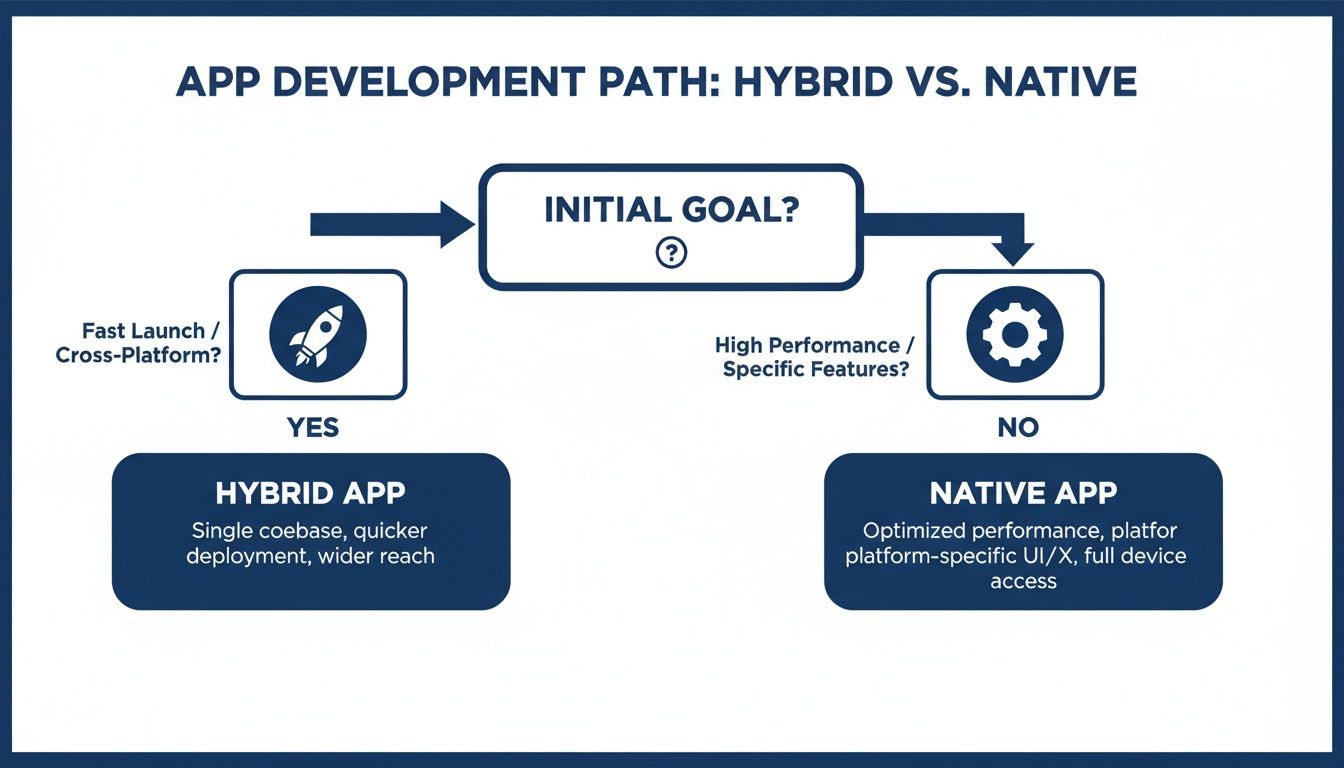
No technology is “better” in a vacuum; alignment with business goals is what matters. Once a hybrid approach is selected, the technical analysis begins.
The Architectural Divide: React Native vs. Flutter
The two dominant frameworks—React Native and Flutter—are architecturally distinct in how they render UIs. This has direct implications for performance, UI consistency, and the development experience.
React Native uses a “bridge” architecture. Your JavaScript code communicates asynchronously over this bridge to invoke native iOS and Android UI components. The advantage is that your app uses the platform’s actual UI elements, which can make it feel more authentic to the device. The disadvantage is the bridge itself. High-frequency communication—for complex animations or rapidly updating lists—can create performance bottlenecks.
Flutter eliminates the bridge. It bypasses native UI components entirely, shipping its own high-performance rendering engine (Skia) to draw every pixel of the user interface itself.
A Flutter app will look and behave identically on every device, down to the pixel. This is a significant advantage for brand consistency but can require extra effort if the goal is to perfectly mimic platform-specific UI conventions that change with OS updates.
This direct-rendering approach gives Flutter a performance advantage for graphically intensive applications. With no bridge to cross, animations and complex UI transitions are often smoother.
The Case for Ionic and Web-Centric Frameworks
While React Native and Flutter dominate discussions, frameworks like Ionic (using Capacitor) fill a critical niche, particularly for enterprise use cases. Ionic wraps a web application inside a native shell, using a WebView to render the UI.
This offers the fastest path to mobile for teams with deep web development expertise (Angular, React, Vue). You can develop hybrid app solutions rapidly. For many internal tools, B2B applications, or content-driven experiences, the performance is sufficient. The trade-off is another layer of abstraction from the native platform. Accessing hardware features like the camera or biometric sensors relies on third-party plugins, which can introduce maintenance dependencies and potential stability risks—a key consideration for enterprise mobile applications.
Hybrid Framework Technical Trade-Offs
This comparison cuts through the marketing to focus on project-critical dimensions.
| Framework | Core Technology | Performance Profile | Best For | Common Pitfall |
|---|---|---|---|---|
| Flutter | Dart & Skia Engine | Excellent, near-native for UI-heavy tasks. | Highly branded, custom UIs; complex animations; brand consistency. | Deviating from platform-native look and feel requires extra effort. |
| React Native | JavaScript & Native UI Bridge | Good, but the bridge can be a bottleneck for complex interactions. | Teams with strong React talent; apps needing a truly native feel. | Over-the-air updates can fail if native dependencies change. |
| Ionic / Capacitor | Web Tech (HTML, CSS, JS) in a WebView | Sufficient for most apps, not for graphically intensive tasks. | Internal enterprise tools; PWAs; rapid mobilization of existing web apps. | Over-reliance on third-party plugins that may become outdated or abandoned. |
The goal is not to find a “winner,” but to map your project’s specific requirements to the framework best suited to solve them.
Mapping Requirements to Frameworks
- Complex, Custom Animations & Brand-First UI: If the application’s value is a highly branded, fluid user experience with custom animations, Flutter is typically the correct choice. Its direct rendering control avoids the performance overhead of the React Native bridge.
- Leveraging a Massive Web Ecosystem: If your team consists of React developers and you need to utilize the existing JavaScript library ecosystem, React Native offers the path of least resistance.
- Internal Enterprise Apps & PWAs: To quickly mobilize an existing web app or build an internal line-of-business tool, Ionic/Capacitor provides the highest velocity. The performance trade-offs are often an acceptable price for speed-to-delivery.
Where Hybrid App Projects Go Wrong
Many hybrid projects fail. The cause is rarely the technology itself—Ionic, React Native, or Flutter are mature frameworks. The failures are predictable and stem from strategic miscalculations made before development begins.
These are the common traps that turn a sound business decision into a technical debt liability.
The “95% Code Share” Myth & Native Module Costs
The projected cost savings of hybrid development can be misleading. That projection often fails the moment a feature requires functionality not available in a standard plugin. In one project requiring high-performance, low-latency Bluetooth LE communication, standard Cordova plugins were insufficient.
The initial budget was $120,000, based on a projected 95% shared codebase. The reality: building custom native modules in Swift (iOS) and Kotlin (Android) added $45,000 to the final cost. This 37.5% cost overrun eliminated a significant portion of the anticipated savings.
The “write once, run anywhere” slogan has an implicit, expensive asterisk: “…unless you need deep, platform-specific hardware access.” Budgeting for this gap is a planning issue, not a framework flaw.
Stress-test your feature list against the framework’s limitations before committing.
- Build a Feature Matrix: List every feature and map each one to a specific, well-maintained community plugin or core framework API.
- Flag the Gaps: Any feature without a production-ready solution is a high-risk item. It requires its own line item in the budget for custom native development.
- Prototype Risky Features First: Before building standard screens, build a proof-of-concept for the most complex native integration. This provides real data on the effort involved and de-risks the project.
Designing a UI That’s an Alien on Both Platforms
A common failure is an app that feels non-native. It is neither an iOS app nor an Android app; it is a website masquerading as an app, and users notice. This occurs when a single, generic UI is deployed to both platforms.
Android’s floating action buttons appear on an iPhone, which is jarring for users expecting a tab bar. iOS-style swipe-back gestures are implemented on Android, confusing users. This UX “uncanny valley” makes the app feel cheap, erodes trust, and negatively impacts user retention. It signals a failure to respect the user’s native environment.
The solution is not building two UIs, but using platform-aware components.
- Render Conditionally: The framework can detect if it’s running on iOS or Android. Use this to show an iOS-style tab bar on an iPhone and a Material Design drawer menu on an Android device.
- Isolate Platform Logic: In React Native, create files like
MyComponent.ios.jsandMyComponent.android.js. The core business logic remains shared, while the UI adapts. - Use an Adaptable Design System: Define core brand tokens (colors, fonts, spacing) but allow for platform-specific implementations of components like buttons and navigation bars. This achieves brand consistency without sacrificing the native feel.
Performance That Feels Like Wading Through Molasses
Sluggish performance is lethal for a hybrid app. Janky scrolling and long startup times are often the result of treating the mobile device like a desktop browser, ignoring its memory and CPU constraints.
A common mistake is rendering a list of 1,000 items by mapping over an array. The app attempts to create all 1,000 UI elements at once, freezing the interface.
The fix is to adopt patterns designed for mobile device limitations.
- Virtualize Lists: Never render a long list all at once. Use built-in solutions like
FlatListin React Native or virtual scrolling libraries. These only render the items currently visible on the screen. - Optimize Startup Time: Defer loading of secondary features, analytics scripts, and non-essential API calls until after the user sees the first screen. A fast “time to interactive” is critical.
- Prevent Unnecessary Re-renders: In component-based frameworks like React, use memoization (e.g.,
React.memo). It prevents components from re-rendering if their props have not changed. This can be the difference between a fluid experience and a laggy one.
Architecting for Performance and Scalability
A successful hybrid app is not merely a web app in a native container. That approach almost always leads to poor performance and maintenance issues. A deliberate architectural strategy is required from day one to build a hybrid app that feels fluid and scales effectively.
The primary challenge is engineering for mobile device constraints: limited CPU, constrained memory, and unreliable network connections. A solid architecture anticipates these bottlenecks.
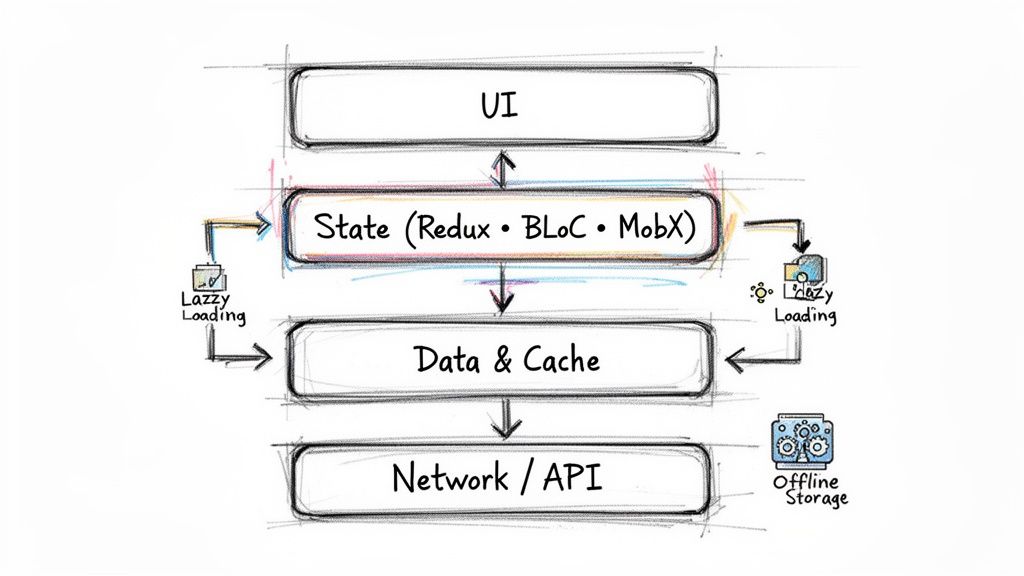
This blueprint is about building a resilient system that performs well and is easy to debug.
Decoupling the UI with State Management
As an application grows, managing data flow becomes its primary challenge. Without a clear system, UI dependencies become tangled, leading to unpredictable bugs and unnecessary re-renders that degrade performance.
A dedicated state management library is non-negotiable.
- Redux/Zustand (React Native/Ionic): These tools enforce a unidirectional data flow. The UI dispatches an action, a central store updates the state, and the UI reacts to that single source of truth.
- BLoC (Flutter): The Business Logic Component pattern isolates business logic from the UI. It uses streams to manage state, which is effective for handling asynchronous events like user input and network requests.
- MobX (React Native/Ionic): MobX uses an observable-based approach that requires less boilerplate than Redux. It automatically tracks dependencies and updates only the necessary components.
The specific library is less important than the principle: separate application state from UI rendering logic. This is the single most effective way to prevent performance bottlenecks and maintain a scalable codebase.
Optimizing Load Times with Code Splitting
Initial load time is a critical first impression. A Google study found that 53% of mobile users abandon a site that takes longer than three seconds to load. Loading an entire JavaScript bundle upfront will result in a sluggish start.
The solution is code splitting and lazy loading.
Instead of a single monolithic bundle, the application is broken into smaller, logical chunks. The code for a “Settings” screen should not be downloaded when the user is on the homepage. With lazy loading, the app only fetches the code for a specific feature when the user navigates to it. Frameworks like React (React.lazy) have this capability built-in.
This can reduce initial bundle sizes by 30-60%, directly improving the user’s first experience.
Managing Data and Network Latency
Every network request is a potential point of failure and a source of latency. An effective architecture minimizes API calls and handles offline scenarios gracefully.
Fetching the same data repeatedly is inefficient. Instead, implement a caching layer. When the app needs data, it first checks a local cache (e.g., SQLite, AsyncStorage). If the data is fresh, it’s served instantly without a network call. If it’s stale or missing, the app fetches it from the API and updates the cache.
This strategy provides two benefits:
- Reduced Latency: Serving data from a local cache is orders of magnitude faster than a server roundtrip.
- Offline Capability: If connectivity is lost, the app can function by serving the last known data from the cache.
This architecture requires careful planning, particularly around cache invalidation. Rolling out such changes can be risky. Our guide on dark launching new architecture provides a practical roadmap for deploying these changes safely.
Budgeting and Vendor Selection: What to Actually Expect
Vague cost ranges are not useful for building a budget. To estimate the actual cost of a hybrid app, you must ground your projections in complexity and account for hidden costs.
For a Minimum Viable Product (MVP) with basic logins and a few screens, the typical cost is $50,000 to $90,000 with a competent agency. This covers initial design, development for iOS and Android, and basic QA.
For a feature-rich enterprise application with offline mode, custom native plugins, and multiple third-party API integrations, the budget climbs into the $150,000 to $300,000+ range. The cost reflects the specialized engineering required to make complex features work reliably.
Uncovering the Hidden Costs
The initial development quote is not the total cost of ownership.
- Ongoing Maintenance: Budget 15-20% of the initial build cost annually. This covers framework updates, security patches, and fixes required by new iOS or Android versions.
- Third-Party Licenses: Paid plugins for maps, real-time chat, or analytics can add thousands of dollars to your annual operational cost.
- Specialized Native Development: A requirement for “high-performance Bluetooth” or “advanced camera controls” will increase the budget. You will need a Swift or Kotlin developer. This can inflate the project cost by 20-40% if not planned for.
Vetting Development Partners
Selecting an agency should not be based on the lowest bid. It is about finding a partner with a proven specialty. Many firms claim to be experts in everything, but the best ones are focused. An agency that excels with consumer-facing Flutter apps may not be the right choice for a B2B enterprise tool built on Ionic.
A significant red flag is a vendor who unconditionally recommends one framework before thoroughly analyzing your specific requirements. A reliable partner will be transparent about a framework’s limitations and where custom native code will likely be necessary.
Demand case studies relevant to your project. Ask direct questions about their experience with the specific native integrations you require.
When NOT to Hire an Agency
Engaging an agency can accelerate development, particularly if you lack in-house mobile experience. However, it can also be a strategic error.
The primary reason to keep development in-house is long-term ownership of a core product. If the mobile app is central to your business and requires continuous, rapid iteration, outsourcing creates a dependency. Your team, not a vendor, should own the architecture and institutional knowledge. Outsourcing may reduce costs in the first year but can impede agility and innovation long-term.
When NOT to Develop a Hybrid App
Knowing when not to use a hybrid approach is as important as knowing when to use one. The promise of speed and cost savings can lead teams to force a hybrid solution onto a problem it is not designed to solve.
This strategic mistake leads to technical debt, poor user experience, and budget overruns that negate any initial savings. Certain application features are clear indicators that a native approach is the only viable option.
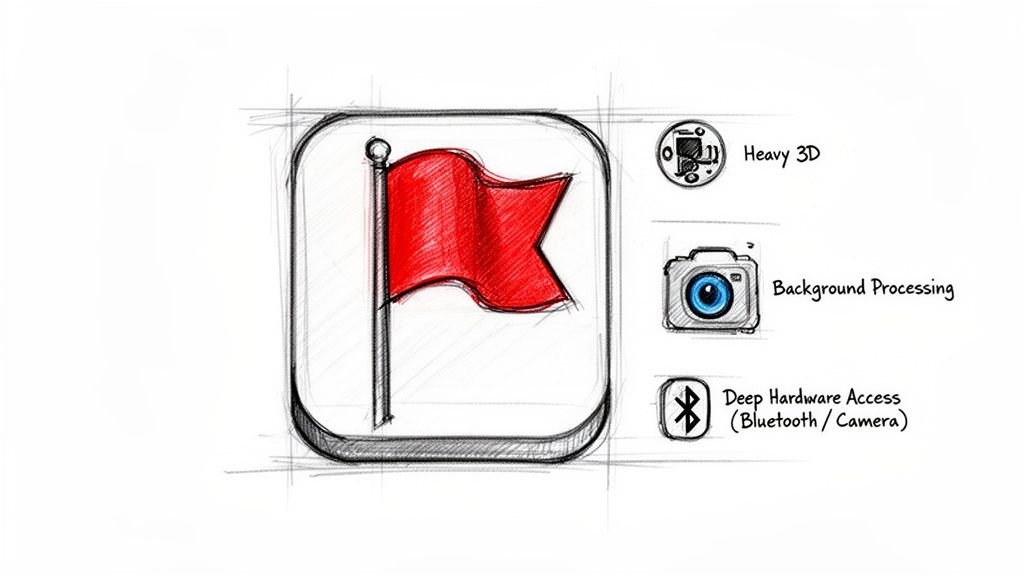
Before committing to hybrid, you must determine if your core feature list falls into one of these high-risk categories.
High-Performance Graphics and Gaming
This is the clearest contraindication. If your app involves complex 3D rendering, augmented reality (AR), or any graphically intense, real-time processing, a hybrid framework is the wrong tool.
Native code has direct access to the device’s GPU through platforms like Metal on iOS and Vulkan on Android. Hybrid frameworks operate through abstraction layers, which introduces unavoidable performance overhead.
While a framework like Flutter has an efficient rendering engine, it cannot match the raw power of direct GPU access. Attempting to use it for these use cases will result in dropped frames and perceptible lag.
Intensive Background Processing
Applications that perform heavy processing while not in the foreground—such as audio processing, video exporting, or complex data synchronization—are poor candidates for a hybrid approach.
Both iOS and Android enforce strict rules on background processes to preserve battery life. Native development provides access to the officially supported APIs (like WorkManager on Android) to manage these tasks reliably. Managing this from a JavaScript-based application is prone to failure, as the OS may terminate the process without warning.
Deep and Custom Hardware Integration
Standard device features like the basic camera, GPS, and accelerometer are well-supported by plugins. However, deep, low-latency control over specific hardware requires a different approach.
Scenarios where native is the only practical choice:
- Advanced Camera APIs: Manual control over focus, exposure, or RAW image capture requires direct access to native libraries like
AVFoundationon iOS. Hybrid plugins are insufficient. - Bluetooth Low Energy (BLE): While basic BLE plugins exist, applications requiring high-throughput data streams or complex peripheral interactions will exceed the capabilities of generic wrappers.
- Custom Accessories: Integration with proprietary hardware over USB or another protocol will almost certainly require custom native modules. The performance and reliability are non-negotiable, making native the more direct and safer path.
Questions from the CTO’s Office
As the technical decision-maker, your questions extend beyond “can we build it?” to long-term viability, hidden costs, and performance under pressure. Here are answers to common questions from technical leaders considering a hybrid approach.
How Does Hybrid Performance Actually Stack Up to Native?
For most common user interactions—tapping buttons, scrolling lists, navigating screens—a modern hybrid app using React Native or Flutter is often indistinguishable from a native app. They can consistently achieve a 60 FPS target.
Performance gaps appear in three specific areas:
- CPU-heavy tasks: On-device image processing or complex data calculations.
- Elaborate animations: Complex animations beyond standard screen transitions can exhibit reduced fluidity.
- Initial App Startup: A well-architected hybrid app typically has a 100-300ms slower cold start than its native equivalent.
The takeaway: if your app’s core value relies on heavy computation or a highly animated interface, you must prototype and benchmark those specific features before committing. Do not rely on generic benchmarks; test your most demanding use case.
What’s the Real Long-Term Maintenance Cost?
Initial development savings can be offset by long-term maintenance costs. This is not a one-time expense. You must budget for the recurring work of keeping the app operational.
This includes framework updates, managing breaking changes in dependencies, and adapting to new OS requirements from Apple and Google.
The most common blind spot is the cost of maintaining custom native modules. The moment you write one, you have compromised the “one codebase” advantage and now require specialized native developers. A prudent estimate is to budget 15-20% of the initial development cost annually for maintenance. Expect this to increase during major iOS or Android releases.
This is the operational cost of keeping your app secure, functional, and available in the app stores.
Can We Just Build a PWA Instead?
For certain products, a Progressive Web App (PWA) is a cost-effective choice, particularly if your app is primarily content-driven and does not require deep hardware integration or the distribution channel of the App Stores.
However, PWAs have significant limitations:
- Push Notifications on iOS: They are not as reliable or deeply integrated as native push notifications.
- Background Execution: True background processing is limited, which is problematic for apps that need to sync data or track location consistently.
- Native API Access: If you require advanced Bluetooth, NFC, or specific sensor data, a PWA cannot deliver.
If any of these features are core to your user experience, a hybrid app provides a more stable and capable foundation.
Making the right architectural and vendor decisions is critical. Modernization Intel provides unbiased, data-driven intelligence on development partners, including real cost benchmarks and common failure points, so you can choose a partner with a proven track record for your specific needs. Get Your Vendor Shortlist at https://softwaremodernizationservices.com.