
80% of Application Migrations Miss Deadlines. A Flawed QA Strategy is Why.
Most application migrations overrun their budgets and timelines. This isn’t an anomaly; it’s a systemic failure pattern. Engineering leaders are frequently held accountable for cost overruns that were, in many cases, preventable.
The primary driver of this failure is a reactive or delayed testing strategy.
Teams often defer critical testing until the final stages. Bugs in the new environment are discovered during UAT or, more critically, after the production cutover. By that point, the financial and operational impact is already locked in.
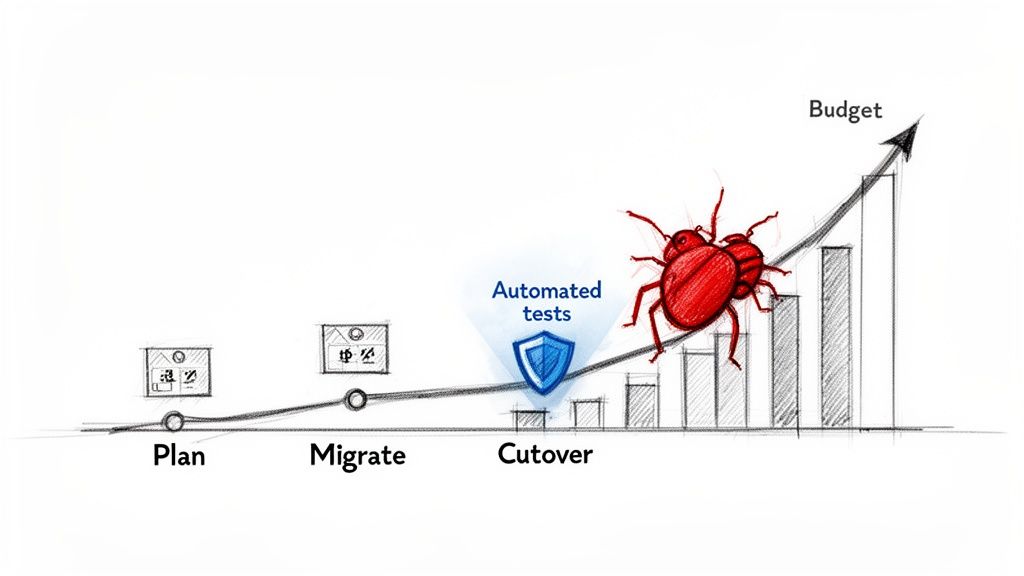
The Economic Impact of Late-Stage Bugs
When testing is treated as a final-stage checkpoint, the cost to remediate defects multiplies. A data integrity issue that requires four developer-hours to fix during the migration phase can escalate to a 40-hour remediation effort post-deployment. This involves emergency rollbacks, data clean-up, and diverting senior engineers from planned work.
When validation is delayed, simple regression bugs that an automated script would have identified in minutes evolve into complex production incidents that erode stakeholder confidence. This is where budgets are broken. Proactive planning is the most effective countermeasure, a theme detailed in our guide to application modernization strategies.
A bug found in production can be 100x more expensive to fix than one found during development. For migrated applications, this cost multiplier is often higher due to the added complexity of new infrastructure and data schemas.
The Disconnect in Cloud Migration Testing
In a cloud migration, automated testing is one of the few levers available to reduce both risk and time-to-value. Yet, many organizations fail to utilize it effectively.
The 2022/2023 World Quality Report identified a significant gap: while nearly half of enterprises run non-production environments in the cloud, only about a quarter systematically embed cloud testing into the migration process. This has a direct financial consequence. The report indicates that three-quarters of cloud migrations exceed their budget, and over 33% miss their deadlines because manual testing processes cannot keep pace.
Automated testing directly mitigates the two most common failure modes in migrated systems:
- Data-Driven Behavioral Anomalies: Subtle changes in database schemas, character encoding, or network latency can trigger application behavior that is not reproducible outside of a production-scale data environment.
- Brittle Integrations: The APIs connecting legacy systems to new cloud services are often fragile points of failure. Automated contract testing is the primary method to ensure these communication channels remain stable post-migration.
Automated testing should not be viewed as a QA function. It is a core risk mitigation strategy for protecting budget, timeline, and organizational credibility.
Building a Risk-Driven Migration Test Strategy
The goal of 100% test coverage is a vanity metric that often leads to wasted resources. A successful migration is not about testing everything; it’s about neutralizing the most significant business risks first. This requires directing automated testing efforts where a failure would have a material impact on revenue or operations.
This approach is not a checklist; it’s a pragmatic framework for mapping application components and user journeys directly to business outcomes. The focus shifts from code coverage to revenue coverage.
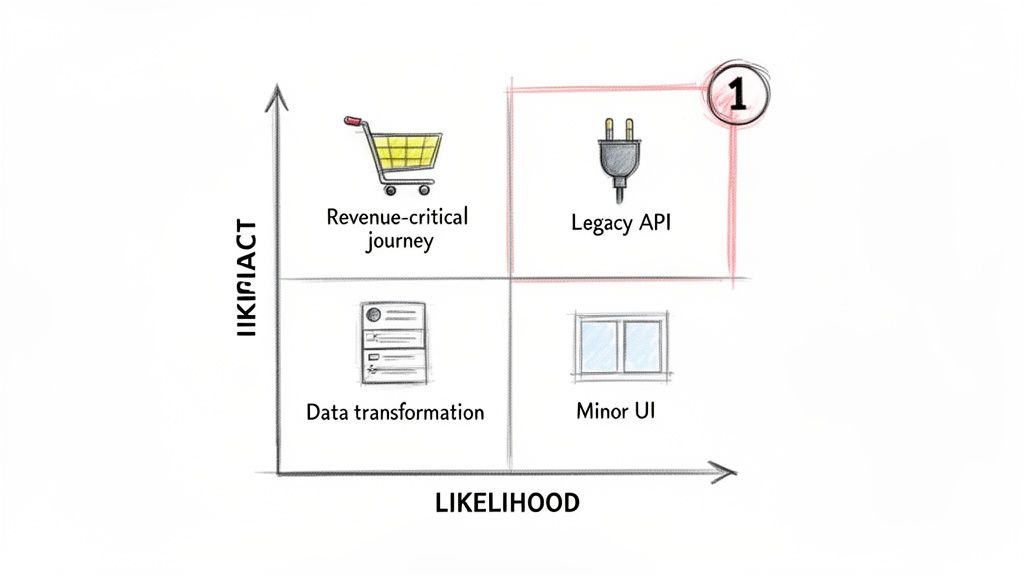
Identifying High-Impact Test Targets
Begin by categorizing application modules and integration points along two axes: business impact and likelihood of failure. This exercise dictates the allocation of finite engineering resources.
- High Impact, High Likelihood: This is the highest priority. An example is a poorly documented legacy API that handles payment processing. A failure here halts business operations. These components demand immediate and comprehensive test automation.
- High Impact, Low Likelihood: These are stable, core functions that would be catastrophic if they failed, such as a user authentication module. They require robust regression suites.
- Low Impact, High Likelihood: This category includes non-critical but annoying bugs, such as a UI rendering issue on an infrequently used admin screen. These are candidates for lower-priority automated checks or manual spot-checks.
- Low Impact, Low Likelihood: This quadrant receives the least attention. It includes static content pages or internal reporting tools with limited use.
The majority of the automated testing budget and timeline should be concentrated in the “High Impact, High Likelihood” quadrant. This is where you build comprehensive suites covering functional correctness, data integrity, and performance. For a more structured approach, our guide on performing a legacy system risk assessment provides a formal process.
Mapping Revenue-Critical User Journeys
Testing should not be confined to individual functions in isolation. Instead, trace and automate the complete paths that generate revenue or ensure compliance.
For an e-commerce platform, this means you automate the entire journey: a user adds an item to the cart, applies a discount code, processes a payment via a third-party gateway, and receives an order confirmation.
A common failure mode is focusing automated tests on isolated units of code while ignoring the complex interactions between services. A risk-driven approach forces you to test the end-to-end business process, which is where most migration-related bugs hide.
This method naturally identifies the most fragile points in the system. Frequently, it’s the seams between systems that break during a migration, not the core application logic itself.
The following matrix connects common migration risks to specific automated testing priorities.
Migration Risk vs. Automated Test Priority
| Migration Risk Area | Example Scenario | Primary Automated Test Type | Priority Level |
|---|---|---|---|
| Data Fidelity | Customer records are corrupted during migration from an on-prem SQL Server to a cloud-based PostgreSQL database. | Data Validation Scripts (comparing record counts, checksums, and field-level data between source and target). | Critical |
| Integration Points | The newly migrated order management system fails to communicate with the legacy third-party shipping API. | End-to-End API Integration Tests (simulating the full order-to-shipment workflow). | Critical |
| Performance Regression | The application’s main dashboard, now running in the cloud, takes 15 seconds to load, up from 3 seconds pre-migration. | Load & Performance Tests (using tools like JMeter or K6 to simulate user load and measure response times). | High |
| User Authentication | Existing users can no longer log in with their old passwords after the identity provider was switched. | Automated Regression Suite (covering login, password reset, and session management user journeys). | High |
| Configuration Drift | Environment-specific settings (database connections, API keys) are incorrect in the new production environment, causing failures. | Smoke Tests (run immediately post-deployment to check basic connectivity and critical path functionality). | Medium |
This table provides a starting point for aligning your testing strategy with real-world migration challenges, ensuring effort is focused where it delivers the most risk reduction.
Prioritizing Based on Technical Complexity
Beyond business impact, technical complexity is a significant driver of risk. Certain components are inherently more prone to failure during a migration and require rigorous automated testing.
Key Areas to Scrutinize:
- Complex Data Transformations: Any ETL (Extract, Transform, Load) process or data synchronization job is a high-risk area for defects. Automated tests must validate data schema, check for data loss, and verify transformations against a known-good dataset.
- Asynchronous Processes: Systems relying on message queues or event-driven architectures can introduce subtle timing and data consistency problems in a new environment. These issues are notoriously difficult to debug manually.
- Stateful Components: Applications managing user sessions or maintaining state across multiple requests are complex to migrate correctly. Automated tests must specifically target session persistence, cache invalidation, and state transitions.
By combining business impact analysis with a technical risk assessment, you create a test plan that builds maximum confidence and transforms testing from a checklist item into a strategic mitigation tool.
The Four Automated Testing Pillars You Can’t Skip
After mapping the risks, the next step is building the test suites that will identify defects. Omitting any of these four pillars introduces significant, unmitigated risk into the migration process.
Functional and Visual Regression Testing
Regression testing answers the fundamental migration question: “Did we break anything?”
Its purpose is to prove that functionality that worked before the migration still works after. However, a common mistake is to focus solely on business logic while ignoring the user interface.
A minor CSS change or a different rendering engine in the new cloud environment can create visual defects that functional tests will not detect. Users may encounter broken layouts or missing images, eroding trust even if the backend logic is sound.
For example, a banking application moves from on-prem to the cloud. A functional test for a wire transfer passes—the transaction completes successfully. However, in the new environment, the confirmation pop-up is misaligned and unreadable on a 13-inch laptop screen. The feature is effectively broken for that user segment. This is a visual regression.
To prevent this, functional automation must be paired with visual regression testing. You can compare the top visual regression testing tools to find one that fits your stack and identifies these UI bugs before users do.
Data Fidelity and Compatibility Testing
Data is a core asset, and migrations place it at risk. Even seemingly straightforward database moves—such as an on-prem Oracle DB to Amazon Aurora for PostgreSQL—can introduce silent data corruption that goes undiscovered for months. The cause is often subtle differences in how data types, character encoding, or numeric precision are handled.
Automated data testing must go beyond simple record counts.
Key Data Fidelity Checks to Automate:
- Record Count Verification: A basic sanity check to ensure no rows were dropped.
- Schema Comparison: Automate checks to confirm table structures, data types, and indexes match.
- Field-Level Data Validation: Use checksums or hash functions on critical columns (e.g., customer IDs, transaction amounts) to verify data integrity.
- Null Value Checks: Ensure columns that should not be null have not been populated with them due to a transformation error.
Without these automated checks, you are operating on the assumption that silent data corruption has not occurred.
Integration and API Contract Testing
Applications depend on a network of internal and third-party services connected by APIs. A migration invariably alters this network—changing an IP address, security certificate, authentication token, or firewall rule.
API contract testing is the primary defense here. It focuses on the “contract”—the agreed-upon format of requests and responses—between your application and its dependent services. If a migrated e-commerce application sends a request that its shipping provider’s API no longer understands, order fulfillment ceases.
Automated contract tests validate this communication layer by confirming two things:
- Your migrated application sends requests that the provider API still accepts.
- Your application can correctly handle all possible responses—including error codes—from that provider.
These tests are lightweight and serve as an early-warning system for broken integrations. This is a core practice in modern DevOps integration for modernization projects.
Performance and Load Testing
Functional correctness does not guarantee performance under load. New cloud infrastructure has a different performance profile regarding CPU, disk I/O, and network latency. Assuming application performance will remain unchanged is a common cause of poor user experience post-migration.
The performance testing strategy is straightforward: baseline the old environment, then run the same tests against the new one.
Core Performance Metrics to Track:
- Response Time: How long does it take to load a primary dashboard or process a search query?
- Throughput: How many transactions can the system handle per second?
- Resource Utilization: How do CPU, memory, and network usage scale under different load levels?
By simulating real-world traffic before cutover, you can identify and fix bottlenecks. The goal is not just to match old performance benchmarks but to exceed them.
Integrating Automated Tests into Your Migration Pipeline
An effective suite of automated tests only delivers value when it is integrated into the migration pipeline, acting as an automated quality gate that prevents defects from propagating.
This transforms testing from a manual, post-hoc inspection into a continuous validation engine. The objective is to make it organizationally impossible for defective code or corrupted data to reach the next environment without triggering a data-driven alert.
This flow illustrates the core testing stages that must be automated in your pipeline, from basic regression checks to final performance validation before cutover.
Each stage acts as a checkpoint that builds confidence by confirming fundamental stability, data integrity, and system interoperability before proceeding.
From Manual Bottleneck to Automated Gatekeeper
Integration begins with your CI/CD tool—Jenkins, GitLab CI, or Azure DevOps. The principle is that every code commit or deployment should automatically trigger a relevant test suite.
A standard staging deployment pipeline should operate as follows:
- The Trigger: A developer merges code into the main migration branch.
- Build & Deploy: The CI/CD server builds the application and deploys it to the staging environment.
- The Smoke Test: A small, fast suite of tests runs immediately to check basic connectivity and critical path functionality. A failure here halts the pipeline.
- The Main Gate: If the smoke test passes, the full regression, API, and data fidelity suites execute. This is the primary quality gate.
- Go/No-Go: The pipeline proceeds to the next stage (e.g., UAT, pre-prod) only if 100% of these tests pass. A single failure stops the process.
This feedback loop reduces the time to detect a bug from weeks to minutes.
Establishing Data-Driven Rollback Criteria
Automated gates provide the quantitative data needed to make objective rollback decisions, removing emotion from the process. Instead of debating a bug’s severity, you define clear thresholds beforehand.
A failure rate over 2% in the critical path regression suite triggers an automatic rollback. A single data fidelity checksum mismatch halts the pipeline and requires a manual override to proceed. These are rules enforced by the machine.
This builds trust with business stakeholders by demonstrating that every deployment is held to a measurable quality standard. With global digital transformation spending exceeding $1.8 trillion, manual spot-checks are an inadequate control for the associated risk. In regulated industries like banking, where 80% of regression testing is already automated, CI/CD integration is a standard requirement for gating go-live events.
Monitoring, Dashboards, and Observability
The CI/CD pipeline should not be a black box. Test results must be visible and actionable. Configure test runners to output results in a standard format like JUnit XML, which CI/CD platforms can parse into real-time dashboards showing:
- Pass/Fail Trends: Are we introducing more regressions over time?
- Execution Times: Is the test suite becoming a bottleneck in the pipeline?
- Flaky Tests: Which tests fail intermittently and erode confidence in the automation?
Effective integration also includes a strategy for continuous monitoring post-migration. This extends validation beyond deployment, tracking application health and performance in real-time under production load to ensure the migrated system remains stable.
How AI Is Reshaping Migration Testing
Manual testing is not a viable strategy for large-scale migrations. The volume of user journeys, API endpoints, and data validation points makes traditional, hand-scripted automation financially prohibitive.
This is where AI-augmented testing tools are beginning to deliver practical value.
The goal is not to replace QA teams but to augment their capabilities. Instead of a QA engineer spending 40 hours scripting tests for a single business process, an AI tool can observe the legacy application—capturing user clicks, API calls, and database queries—and generate a baseline suite of functional tests in a few hours. This allows engineers to focus on strategic review, edge-case analysis, and refinement rather than script creation.
This is a clear market trend. Gartner’s 2024 guidance predicts that 80% of enterprises will have these tools integrated by 2027, up from just 15% in early 2023. Already, 35% of enterprise testing budgets are shifting toward AI platforms, and 67% of new tool evaluations now include explicit AI-native requirements. This allows organizations to generate and maintain thousands of migration-aware tests without a linear increase in headcount. You can find more data on the automation testing market growth on imarcgroup.com.
Self-Healing Tests and Anomaly Detection
One of the most practical applications of AI in automated testing for migrated applications is self-healing. A common point of failure for test pipelines is a minor UI change, such as a developer renaming a button ID from btn_submit to btn_confirm. A traditional Selenium script would fail.
An AI-powered tool, however, uses visual and contextual cues to recognize the element’s new identity. It identifies a button in the same position with similar text and updates the test script automatically. This feature prevents numerous pipeline failures caused by trivial front-end changes.
These platforms also excel at detecting anomalies that humans would likely miss. By analyzing performance data from both legacy and new systems, an AI can flag subtle regressions before they become major issues.
For instance, if an API endpoint’s average response time increases from 80ms to 120ms after migration, it might not breach a static performance threshold set at 200ms. A traditional test would pass. An AI model, however, would identify this as a statistically significant deviation from the baseline, alerting the team to a potential performance bottleneck.
Where AI Testing Currently Falls Short
AI testing tools are not a panacea. Their most significant weakness is a lack of business context. They are effective at generating tests based on what is, not necessarily what should be. An AI tool will codify an existing bug in a legacy application into a new “passing” test case because it does not understand the underlying business rule.
They also struggle with validating nuanced, non-obvious business logic that isn’t explicitly visible in the UI or API traffic. Human oversight remains critical to ensure that generated tests reflect true business requirements, not just a snapshot of the old system’s flaws.
When to Partner with a Testing Specialist
The decision to handle migration testing in-house versus engaging a specialist is a high-stakes calculation. Internal teams possess invaluable business context, but tasking them with building a specialized automated testing practice under a tight deadline is a common point of failure for migrations.
An incorrect decision can lead to a stalled project or an unbudgeted, six-figure consulting engagement. The choice is a pragmatic assessment of internal capabilities versus project risks.
Triggers for Engaging a Partner
The decision typically depends on three factors: a need for niche skills, an aggressive timeline, or the requirement for an unbiased assessment.
- You’re Migrating Niche Technology: If you’re moving off a mainframe, your team may lack expertise in COBOL test automation. Attempting to build this capability mid-project is likely to cause significant delays.
- The Go-Live Date is Fixed and Aggressive: Building a robust, automated testing framework takes months. If the cutover is in six months, there may not be enough time to hire, train, and equip an internal team. A specialist partner arrives with pre-built frameworks and experienced personnel, compressing that timeline.
- You Need an Independent Assessment: Internal pressure to meet deadlines can lead to a compromised view of quality. An external partner’s primary objective is to identify defects before customers do, providing unbiased, third-party validation.
A classic failure mode is assigning migration testing to a generalist QA team. They may lack knowledge of the specific failure patterns of the platforms involved. For instance, a team without experience in mainframe EBCDIC to ASCII data conversion will likely miss the subtle data corruption bugs that can cause production outages.
How to Vet a Potential Testing Partner
If you decide to engage a partner, the vetting process must be rigorous and focused on tangible evidence. The market contains many firms that claim “migration expertise” but lack direct experience.
Demand proof, not marketing claims.
- Show Me Your Frameworks: Instead of asking about experience, ask, “Can you demo your pre-built automation accelerators for our specific legacy and target tech stacks?” If they propose building a framework from scratch, they are not specialists.
- What are Your Engagement Models?: A qualified partner will offer flexible models, such as staff augmentation (embedding experts in your team) or a managed service (taking full responsibility for the testing scope). Avoid vendors with a rigid, one-size-fits-all approach.
- Let’s See the Case Studies: Request detailed case studies from migrations of similar scale and technology. Ask for specific “before” and “after” metrics.
You are not seeking a vendor to fill seats. You are seeking a strategic partner with a verifiable track record in preventing the specific failures to which your migration is most vulnerable.
Got Questions? We’ve Got Answers.
The same questions arise in nearly every migration project kickoff. Here are direct answers based on field experience.
What is the Target Number for Test Coverage?
There isn’t one. Pursuing 100% coverage is an inefficient use of resources.
A risk-driven approach is more effective. Concentrate automation on the 20-30% of the application that drives 80% of the business value. This includes revenue-critical user journeys, fragile integration points, and complex data transformations. Correctly testing these areas mitigates the most significant risks.
What Percentage of the Budget Should Be for Automation?
While it varies, a reasonable allocation for testing and automation is 15% to 25% of the total migration budget.
Projects that allocate less than 10% often encounter significant post-cutover issues, leading to emergency fixes and budget overruns. This expenditure should be viewed as an insurance policy, not just a QA line item.
Can We Start Testing After the Migration is Complete?
No. This is one of the most common and costly mistakes.
The automated test suite must be built before the migration begins. A baseline suite running against the legacy application is required to provide objective proof that the new application functions correctly. Starting late turns methodical validation into frantic bug hunting.
What’s the Single Biggest Mistake You See Teams Make?
Ignoring the data. Teams often focus on application features and assume the underlying data migrated correctly. This is a high-risk assumption.
Silent data corruption can be caused by subtle issues like changes in character encoding or decimal precision. It can go undetected for months, corrupting reports and operational data. By the time it is discovered, the damage to customer trust and business operations can be substantial. Automated, field-level data validation is not optional; it is essential.
Should We Use Manual or Automated Testing?
Both are necessary, as they serve different purposes. Manual testing remains valuable for exploratory testing and usability checks, where human intuition is required to identify awkward workflows or confusing UI elements.
However, for the scale and repetitive nature of migration validation—regression suites, performance baselines, data integrity checks—automation is the only viable approach. Attempting to perform these tasks manually is too slow, error-prone, and cost-prohibitive for any significant project.
Making the right call on migration strategy and partners is critical. Modernization Intel provides the unbiased, data-driven intelligence you need to vet vendors and build a defensible plan, cutting through the marketing noise to show you what works and what fails. Get your vendor shortlist and de-risk your project at https://softwaremodernizationservices.com.