A Pragmatic Guide to Mainframe Exit Strategy Planning
Develop a realistic mainframe exit strategy planning framework. Learn how to assess workloads, model costs, and avoid common migration failures for good.
On this page
- Overview
- The First Step: Drop the All-or-Nothing Approach
- Avoiding the Rewrite-Everything Default
- A Framework for Realistic Workload Classification
- Workload Classification Matrix For Mainframe Exit Planning
- Migration Paths and Their Failure Modes
- Common Paths and Where They Go Wrong
- A Practical Risk Assessment Checklist
- Building a Defensible Cost Model
- Beyond the Price Per Line of Code
- A Practical TCO Comparison Framework
- How to Structure Vendor Contracts That Enforce Accountability
- Ditch Time-and-Materials for Milestone-Based Payments
- Clauses for Technical Guarantees
- Data Fidelity and Your Right to Walk Away
- Next Steps: Build a Scalable Rollout Plan with a Pilot Project
- Selecting the Right First Mover
- Defining Success Beyond "It Works"
- From One-Off Pilot to a Migration Factory
- Common Questions About Mainframe Exit Strategy Planning
- When Should We Absolutely Not Exit the Mainframe?
- How Do We Measure the True Success of a Migration?
- What Is the Biggest Unseen Risk in Data Migration?
A successful mainframe exit strategy starts with an honest conversation about what “exit” means for your business, before any code is written. The goal is a data-driven decision about which workloads belong where, one that protects operational resilience and makes financial sense.
The First Step: Drop the All-or-Nothing Approach
The all-or-nothing approach to mainframe modernization leads to failed projects, blown budgets, and cloud repatriations. For nearly every large enterprise, the realistic outcome is a hybrid model, not a complete evacuation. Drop the binary thinking first.
Recent data shows a shift away from wholesale migration plans. Organizational plans to migrate most applications off the mainframe fell from 36% in 2024 to 28% in 2025. That eight-point drop points toward workload-by-workload planning.
Of 500 organizations surveyed, only one intended a complete exit, which makes the hybrid model the dominant strategy. You can find more data backing this up in our mainframe modernization research.
Avoiding the Rewrite-Everything Default
Before you call a single vendor or analyze a line of COBOL, your leadership team must agree on what success looks like. Is it reducing MIPS consumption by 40%? Or moving customer-facing applications to a more agile environment while leaving the core transaction processing system on the Z-series?
Without this clarity, teams default to rebuilding everything, which is slow, expensive, and ignores that many mainframe applications perform well. The 80/20 rule applies: roughly 80% of your mainframe applications require no functional changes, while only 20% are true candidates for a rewrite or replacement. Ignoring this leads to budget overruns and operational disruption.
The most expensive mistake in mainframe modernization is solving a problem you don't have. If an application is stable, performs its function, and doesn't impede business agility, a full rewrite is high-risk and low-reward. Focus your resources where they will deliver business value.
This decision tree starts with a high-level assessment of business criticality and technical debt, which then points to either migration or a hybrid solution.
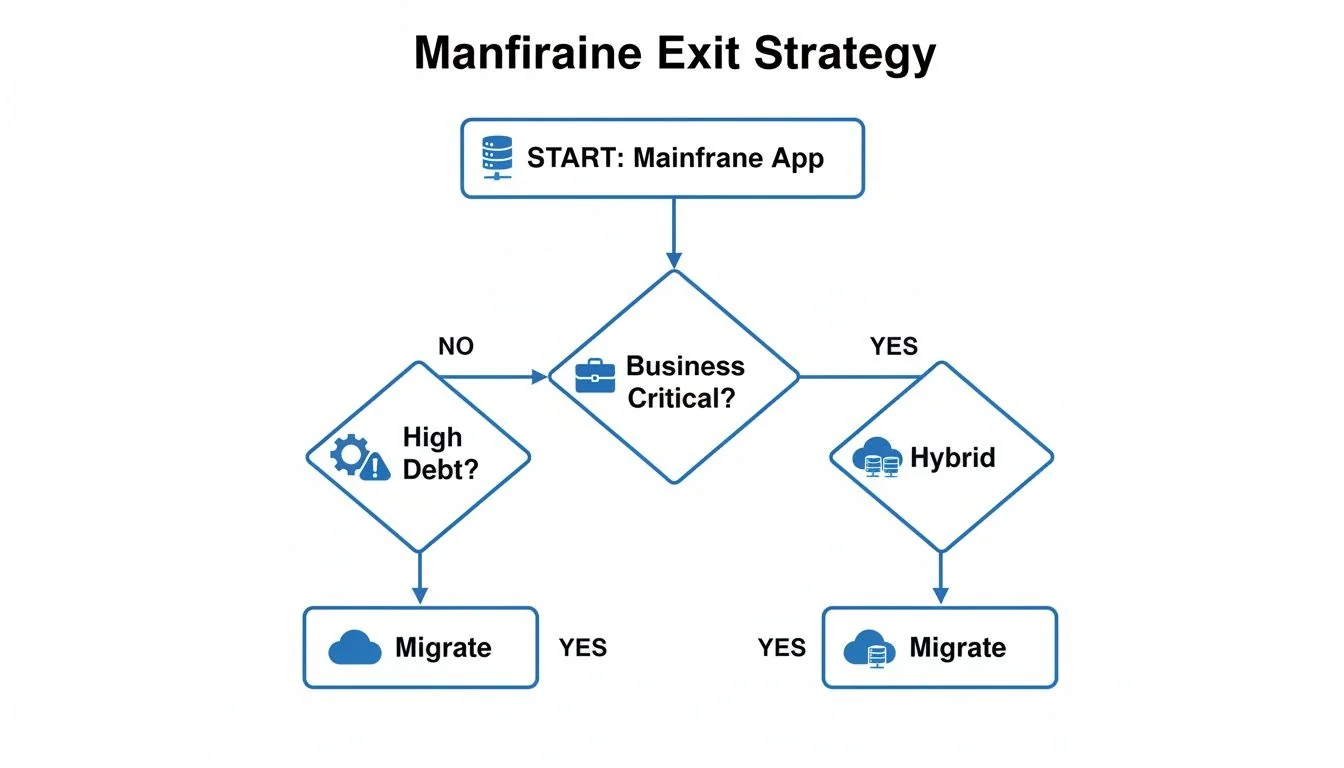
As the flowchart shows, not every application ends up in the cloud. A hybrid state is a valid, and often optimal, outcome for your most critical systems.
A Framework for Realistic Workload Classification
To get past gut-feel decisions, use a workload classification matrix that categorizes your application portfolio by business and technical drivers. Plot your applications on it and assess the right path for each one.
Workload Classification Matrix For Mainframe Exit Planning
The matrix maps each workload profile to a modernization path.
| Workload Profile | Business Criticality | Technical Viability for Migration | Recommended Exit Path |
|---|---|---|---|
| Core Transactional Systems | High (System of record, revenue-generating) | Low (Complex, high data gravity, deep integration) | Optimize/Retain. Focus on API enablement (Zowe) and cost reduction. Avoid migration. |
| Batch Processing | Medium (Critical but not real-time) | Medium (Often self-contained but large data volumes) | Re-platform/Automate. Move to modern schedulers or cloud-native batch services. |
| Agile-Dependent Apps | High (Customer-facing, needs frequent updates) | High (Often smaller, less entangled) | Rewrite/Replace. High-priority candidates for full modernization to microservices. |
| Legacy Reporting Tools | Low (Internal use, easily replaced) | High (Simple logic, low data volume) | Retire/Replace. Good candidates for replacement with a modern BI or analytics platform. |
This classification separates the "must-moves" from the "leave-alones," so resources do not go to low-value migrations.
To populate this matrix, evaluate each major application or workload against these core factors:
- Business Criticality: How essential is this application to revenue or core operations? A system processing billions in daily transactions has a different risk profile than a back-office reporting tool.
- Data Gravity: Where does the data live, and how hard is it to move? Applications with massive, complex DB2 or IMS databases and tight integrations are difficult migration targets.
- Regulatory Exposure: Does the application handle sensitive data subject to PCI DSS, GDPR, or HIPAA? The cost and complexity of proving compliance in a new environment are substantial and cannot be an afterthought.
- Need for Agility: How often does the business need to change this application? Systems that must adapt to market demands are strong candidates for modernization. Stable, unchanging systems are not.
Migration Paths and Their Failure Modes
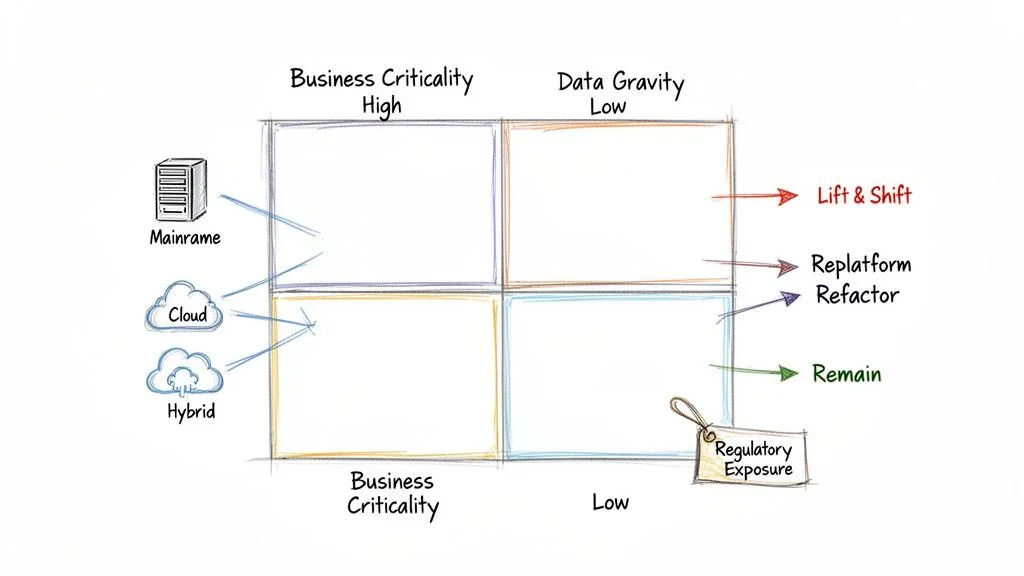
After sorting your workloads, map each application segment to a technical migration path. This goes beyond labels like "Rehost" or "Rearchitect" into the details of execution.
Every path has its own risk profile and well-documented failure modes. Anticipate them.
A migration decision is effectively permanent. Among companies that have completed a mainframe migration, 60% report that zero workloads ever moved back. With so little reversal, a bad strategy or botched execution has lasting consequences, so upfront diligence matters.
Common Paths and Where They Go Wrong
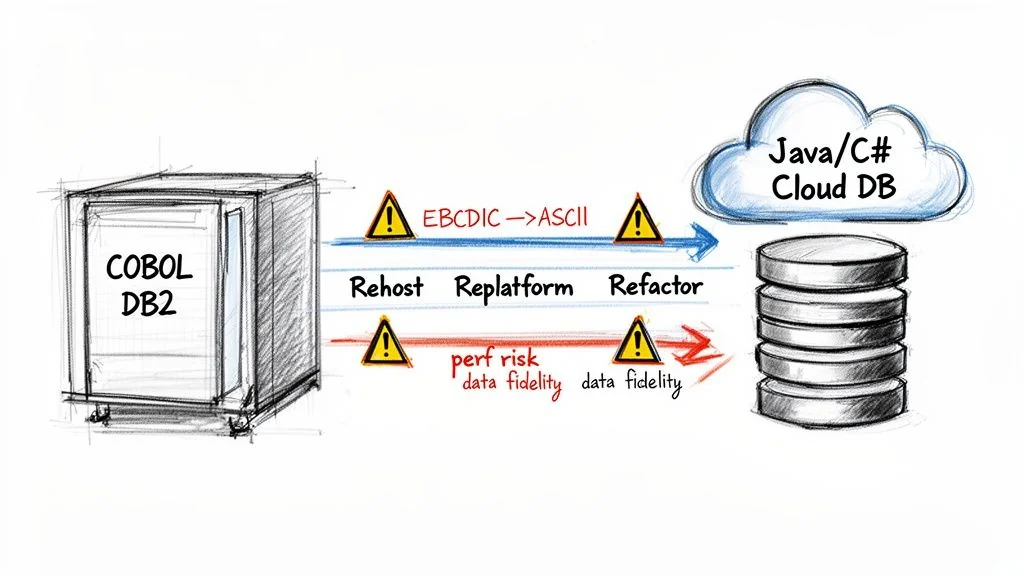
These are the three most common migration paths and where they typically break down.
-
COBOL to Java/C# Refactoring: This automated approach promises to convert your business logic into a modern language. The main failure mode is severe performance degradation. Automated tools can produce verbose, inefficient Java or C# that is hard for a human to maintain, because it does not map cleanly to COBOL's highly optimized structure.
-
Database Migration (DB2 to Cloud-Native): Moving data from platforms like DB2 to cloud-native options like PostgreSQL is fundamental to any exit. Success depends on an accurate data transfer, which makes a deep understanding of data migration best practices essential. The most damaging failure here is silent data corruption.
-
Data Replication for Hybrid Cloud: For any phased migration or long-term hybrid strategy, you need real-time data replication between the mainframe and the cloud. The primary failure mode is latency and data drift. Replication tools often struggle with high-volume OLTP systems, leading to a state where your cloud environment is running on stale data. For any system that demands transactional consistency, this is a non-starter.
One of the most common pitfalls is underestimating character set conversion. Mainframes use EBCDIC; modern systems use ASCII/Unicode. A naive bulk conversion will silently corrupt packed decimal fields (COMP-3), leading to subtle financial miscalculations that can go undetected for months.
This risk is not theoretical: it is a leading cause of post-migration financial reconciliation failures that can cost millions. The complexity of these moves is why organizations seek expert guidance on the broader legacy system modernization journey.
A Practical Risk Assessment Checklist
Use this checklist to turn these risks into action items. It can form the technical backbone of your RFPs and vendor evaluations.
Refactoring and Code Conversion Risks
- Performance Benchmarks: Does the vendor contractually commit to a performance SLA? For example, will refactored code execute with a response time within 110% of the mainframe baseline? Get it in writing.
- Code Maintainability: Demand to see a sample of the converted code. Is it clean, readable, and maintainable by a competent developer, or is it unreadable "transpiled" output?
- Decimal Precision: Ask them to prove how their tools handle COBOL's COMP-3 packed decimal fields. Demand a specific demonstration showing how they prevent precision loss when converting to Java or C# data types.
Data Migration and Fidelity Risks
- EBCDIC to ASCII: What is the exact methodology for validating the EBCDIC to ASCII conversion? This must go beyond record counts and include checksums and field-by-field validation for your most critical datasets.
- Data Type Mapping: How will complex mainframe data types, like VSAM KSDS or IMS segments, be mapped to a relational model without losing their implicit relationships? A simple table dump is not sufficient.
- Data Reconciliation: What specific tools and processes will be used for a full, value-based reconciliation of critical data after the migration? "We'll check the record counts" is not an acceptable answer.
Architectural and Security Risks
- Batch to Event-Driven: If you're converting batch jobs, how will complex job dependencies and scheduling logic (your JCL) be replicated in the new architecture? A simple "lift-and-shift" often breaks this logic.
- Security Translation: How, exactly, will mainframe security rules from systems like RACF or ACF2 be mapped to cloud IAM policies? A failure here can create serious security holes in your new environment.
Asking these questions early turns a hopeful strategy into a defensible plan. The aim is to anticipate the failure modes and build contractual and technical guardrails against them.
Building a Defensible Cost Model
Any migration partner can show you a slide deck promising 30-50% savings by moving off the mainframe. The hard part is building a financial model that holds up in practice.
A defensible plan requires your own total cost of ownership (TCO) model, one that accounts for the often hidden costs of a complex migration. Do not rely on a vendor's best-case scenario: vendor TCO calculators are sales tools and tend to be optimistic about transition costs and cloud operating conditions.
Many modernizations are seen as failures for this reason. The systems work, but they cost double what was promised, which leaves sticker shock and a credibility gap with the business.
Beyond the Price Per Line of Code
Fixating on a single metric like cost per line of code is a classic mistake. Automated COBOL refactoring projects often fall between $1.50 to $4.00 per LOC, but that is only part of the cost. The rest is indirect and operational costs that vendors often leave out of initial quotes.
Your cost model needs to treat the migration as a multi-year program with distinct financial phases, not a one-off project.
A vendor’s estimate focuses on getting you to "go-live." Your cost model must focus on the total expense of running the new system reliably for the next five years. The gap between those two numbers is where budgets overrun.
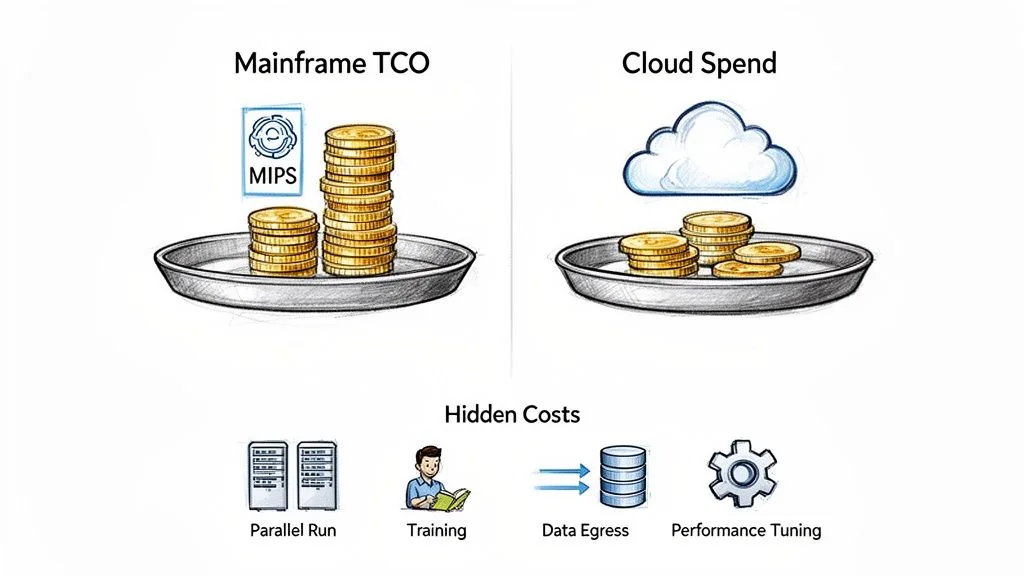
To create a model that holds up, quantify the "hidden" cost centers. These expenses will hit your budget whether or not the vendor quote includes them.
Key Hidden Costs to Model:
- Parallel Run Expenses: For 6 to 18 months, you will pay for both the mainframe and the new cloud environment. This dual-cost phase is often the single largest unforeseen expense.
- Performance Tuning and Optimization: Your migrated application will not perform optimally out of the box. Budget for at least 3-6 months of post-launch performance engineering. This means significant cloud spend for scaled-up test environments and specialized engineers.
- Staff Retraining and Augmentation: A mainframe team does not become a cloud-native DevOps team on its own. Factor in extensive training and likely hiring of cloud specialists to bridge the skills gap during the first 1-2 years.
- Data Egress Fees: If your architecture moves large datasets out of your cloud provider's network, these fees accumulate quickly. Model your data transfer volumes now.
- The Long Tail of Cloud Operations: Your cloud bill includes monitoring tools, security services like WAF and threat detection, and CI/CD pipeline maintenance as well as compute and storage. These can add another 15-25% to your core infrastructure costs.
A Practical TCO Comparison Framework
To build a model that withstands CFO scrutiny, calculate your fully-loaded mainframe cost and compare it to a fully-loaded cloud projection. Do not just compare MIPS to vCPUs. For a more detailed breakdown of these expenses, see our guide to understanding the complete costs of legacy modernization.
This framework supports an apples-to-apples comparison.
| Cost Component | Fully-Loaded Mainframe Cost | Projected Cloud TCO (Year 1-3) |
|---|---|---|
| Hardware | Mainframe hardware lease/purchase, maintenance | Reserved Instances, On-Demand pricing, storage costs |
| Software | IBM software licenses (z/OS, DB2, CICS), ISV tools | Cloud provider services, new ISV licenses, SaaS tools |
| Labor | Mainframe specialists, operators | Cloud engineers, DevOps specialists, SREs, retraining costs |
| Transition | N/A (ongoing operations) | Parallel run costs, migration services, performance tuning |
| Indirects | Data center space, power, cooling | Data egress fees, cross-zone traffic, support plans |
A multi-year plan that reflects the full investment lets you secure the necessary budget and set realistic expectations, and it avoids the sticker shock that derails projects and undermines the credibility of your mainframe exit strategy.
How to Structure Vendor Contracts That Enforce Accountability
Your vendor contract is one of your main risk mitigation tools. A generic Master Services Agreement (MSA) offers little protection against the failure modes specific to a mainframe migration, so the contract needs to be written to enforce accountability.
A properly structured agreement aligns your partner’s financial incentives with your project's technical and business success. If they don't deliver, it costs them real money.
Ditch Time-and-Materials for Milestone-Based Payments
The time-and-materials model suits mainframe projects poorly: it rewards the vendor for dragging things out and adding people. Shift payment from effort to outcomes.
Structure the payment schedule around concrete, verifiable deliverables. That moves financial risk from your balance sheet to the vendor's.
Key Payment Milestones to Build In:
- Successful Pilot Completion: Payment is tied to the first migrated application running smoothly and hitting every predefined success metric.
- User Acceptance Testing (UAT) Passed: A significant payment tranche is released only after business users sign off, confirming functionality is 100% intact.
- Performance SLAs Met: Hold a portion of the final payment in escrow until the migrated system proves it can meet or exceed performance targets for a sustained period, like 30-60 days post-go-live.
This structure ties payment to tangible progress rather than billable hours.
Clauses for Technical Guarantees
Your legal team and enterprise architects should translate technical risks into contractual obligations together. Vague promises of "high performance" are unenforceable; you need specific, measurable guarantees written into the contract.
Your contract must be written for the worst-day scenario. Assume the project will go wrong and the vendor will underperform. The clauses you add either bring the project back to plan or give you a clean exit.
Demand clauses that cover the most serious failure modes of a mainframe migration. If a vendor pushes back hard on these terms, treat it as a red flag: it suggests they are not confident they can deliver.
Example Performance Guarantee Clause: "Vendor guarantees that for the 90-day period following go-live, the average response time for critical online transactions (as defined in Appendix A) in the production cloud environment will not exceed 110% of the established mainframe baseline performance metrics. Failure to meet this Service Level will result in penalties as defined in Section X."
Data Fidelity and Your Right to Walk Away
The contract has to specify the exact mechanism for validating data fidelity. Go beyond simple record counts and demand value-based reconciliation. You also need a pre-negotiated exit if the relationship sours.
Structure the agreement so it also enables your exit from the vendor relationship. A clear termination clause in contract defines that exit and the terms for disengagement.
The agreement should codify these protections.
| Contractual Clause | Purpose and Key Elements |
|---|---|
| Data Fidelity Validation | Mandates a field-by-field, value-based comparison of critical datasets between the source and target systems. It should specify the tools to be used and require vendor sign-off on 100% data integrity before final payment. |
| Penalty for Missed Deadlines | Establishes clear financial penalties for missing key milestones, such as a percentage of the milestone payment for each week of delay. This gives the vendor an incentive to stay on schedule. |
| IP and Work Product Ownership | Explicitly states that you own all converted code, scripts, configuration, and documentation generated during the project. This stops a vendor from holding your modernized system hostage. |
Embedding these accountabilities in the contract sets clear expectations and gives you leverage to keep your mainframe exit on track.
Next Steps: Build a Scalable Rollout Plan with a Pilot Project
A mainframe exit works as a series of deliberate steps. A "big bang" migration is a high-stakes gamble that is likely to fail. Run a pilot-driven program that de-risks the work step by step and builds a repeatable process.
The pilot should do more than move one application: it should produce a blueprint for a "migration factory", the repeatable process that will eventually move dozens or even hundreds of workloads off the mainframe.
Selecting the Right First Mover
The temptation is to pick the easiest, least important app for the pilot. That's a mistake: a trivial workload proves almost nothing.
The ideal pilot is complex enough to be a meaningful test but not so critical that a problem threatens the business. It should force you to exercise your entire end-to-end process.
Look for these characteristics:
- Representative Technology: Does it use a common stack (e.g., COBOL, DB2, CICS) that you'll see again in more complex systems? This validates your core technical approach.
- Toolchain Stress Test: Will it force your team to use the new CI/CD pipelines, code conversion tools, data migration scripts, and observability platforms?
- Architectural Proving Ground: Does migrating it validate your target cloud architecture, including its security model, network topology, and data access patterns?
- Balanced Risk Profile: Is it important to the business but not a Tier-0, customer-facing system? An internal application with a limited user base is often a good choice.
A better choice than a simple, standalone batch job is a small online application with a few database tables and a moderate user base. This gives you a real-world test of performance, data integrity, and day-to-day operational readiness.
Defining Success Beyond "It Works"
"It works" is not a metric. Define quantitative success criteria before you start, as a scorecard with specific, measurable targets that act as a quality gate for every migration that follows.
A pilot that goes perfectly is almost as useless as one that fails completely. The ideal pilot surfaces painful, unforeseen problems (data conversion errors, performance bottlenecks, security gaps) in a low-risk context. Its real value is in the lessons learned, not in a flawless first run.
The pilot scorecard should cover the domains that matter to the business.
| Metric Domain | Key Performance Indicator (KPI) Example | Success Threshold |
|---|---|---|
| Performance | Average transaction response time | Must be within 110% of the mainframe baseline. |
| Cost Accuracy | Monthly cloud operating cost | Must be within 15% of the pre-migration TCO model. |
| Operational Stability | Application error rate (post-launch) | Must be equal to or lower than the mainframe's rate. |
| Data Fidelity | Reconciliation of critical data fields | Must achieve 100% value-based match with source data. |
Hitting these targets shows your technical approach is sound and your financial model credible. Missing them shows where to adjust your strategy before you touch a more critical system.
From One-Off Pilot to a Migration Factory
The lessons from the pilot feed your migration factory. Once the pilot application is stable in production, run a thorough, blameless post-mortem and analyze every step of the process.
- What manual steps caused delays and can now be automated?
- Where did our cost or timeline estimates miss the mark, and why?
- What new, specific test cases do we need to add to our regression suite to catch the bugs we found the hard way?
The output of this analysis is a refined playbook: a collection of documented procedures, automated scripts, and standardized configurations. This playbook is the core of your migration factory. The next application starts from a known, tested process rather than from scratch, so teams get faster, and each subsequent migration turns the mainframe exit from a series of high-risk projects into a more predictable, scalable program.
Common Questions About Mainframe Exit Strategy Planning
Even a detailed roadmap leaves practical questions open. These are the answers to the questions we hear most often from technical leaders.
When Should We Absolutely Not Exit the Mainframe?
Hold off on a full exit when a core application is a “black box,” as with decades-old financial systems where the original developers are gone and documentation is missing. If the business risk of a single miscalculation is severe, such as incorrect interest accrual across millions of accounts, a full migration is an unacceptable gamble.
The other stop signal is extreme performance. If your application has strict transaction throughput requirements that are unproven or very expensive to meet on the cloud, don't migrate it. Some high-frequency trading platforms or core banking ledgers process volumes that are difficult and costly to replicate reliably in a distributed environment.
In these cases, a hybrid approach is the responsible strategy. Modernize the user-facing interfaces and build APIs around the core, but leave the processing engine on the mainframe, where its performance and reliability are already known.
How Do We Measure the True Success of a Migration?
Success is validated against a scorecard you defined upfront, tracking performance for at least 6-12 months after the cutover, not at go-live. A successful project shows your business case and technical strategy were sound.
Your scorecard must include these KPIs:
- Cost Realization: Is the new environment's total cost of ownership (TCO) within 10-15% of your financial model? This confirms your business case wasn't wishful thinking.
- Performance Parity: Are application response times and critical batch job windows matching or beating the mainframe baseline?
- Operational Stability: Is the new system's uptime and error rate meeting or exceeding the mainframe's reliability?
- Functional Equivalence: Has 100% of the original business logic been replicated with zero functional regressions? This needs to be signed off by business users, not just the IT team.
Declaring victory before you have 6-12 months of data on these metrics is premature. It can hide long-term problems that surface later.
What Is the Biggest Unseen Risk in Data Migration?
The biggest unseen risk is silent data corruption, often caused by character set conversion.
Mainframes use the EBCDIC character set. Cloud and modern systems use ASCII or Unicode. A naive, unchecked conversion process threatens your data's integrity.
This is especially treacherous with packed decimal fields (often called COMP-3), which are common in COBOL applications for financial calculations. An incorrect conversion can subtly corrupt these values, leading to serious financial miscalculations. You might not discover it for months, long after the original mainframe data is gone.
You need a specific, rigorous mitigation strategy for this. Your test plan must include a full, value-based data reconciliation using checksums and field-by-field validation for every critical dataset. Force your migration vendor to demonstrate their specific tools and expertise for handling these data types, not just promise them. Anything less leaves your data at risk.
Chief Analyst, Software Modernization Intelligence · 10+ years B2B market research
Published: