Your Guide to a CI/CD Pipeline Modernization Strategy
Develop a CI/CD pipeline modernization strategy that delivers value. This guide covers decision frameworks, migration patterns, and executing a successful plan.
On this page
- Overview
- Why Your Legacy CI/CD Pipeline Is a Hidden Cost Center
- The True Expense of Inaction
- Quantifying the Hidden Costs
- A Decision Framework for When to Modernize Your Pipeline
- Technical Debt and Architectural Bottlenecks
- Business Blockers and Compliance Failures
- CI/CD Modernization Decision Matrix
- When Not to Modernize
- Core Modernization Patterns And Their Trade-Offs
- Lift-And-Shift To Cloud-Native Tools
- The Strangler-Fig Pattern For Phased Migration
- Greenfield Rewrite For New Services
- Calculating the True Cost and ROI of Modernization
- Deconstructing the Total Cost of Ownership
- Modeling a Credible Return on Investment
- Key Metrics for Calculating ROI
- How to Navigate the Crowded CI/CD Tools Market
- Integrated Platforms vs. Best-of-Breed Toolchains
- Core Evaluation Criteria for Tool Selection
- The Overlooked Role of Implementation Partners
- Your 90-Day Action Plan for a Successful Modernization
- Phase 1: The First 30 Days
- Phase 2: The Next 30 Days
- Phase 3: The Final 30 Days
- Next Steps
Modernizing your CI/CD pipeline is a business decision about costs that never show up on a P&L statement. The goal is to turn a slow, brittle delivery process into a faster one: ship sooner, cut developer friction, and shorten the time it takes to fix production failures. The payoff is shorter time-to-market and the system stability that protects revenue, along with happier engineers.
A pipeline modernization project is a business case, and framing it as a "technical upgrade" undersells it. An outdated pipeline is an unmeasured cost center that wears down developer productivity, stifles innovation, and adds risk to your operations.
Why Your Legacy CI/CD Pipeline Is a Hidden Cost Center
The real expense is not the servers your old Jenkins instance runs on. It is the opportunity cost of slow, manual, and unreliable software delivery. When a competitor can deploy features multiple times a day while you are on a weekly or monthly release cadence, you lose the ability to react to the market, not just a speed race. The costs are buried in developer toil, long incident resolutions, and constant worry about compliance, and none of them appear on a balance sheet.
The True Expense of Inaction
When your engineers spend their days fighting brittle scripts, staring at progress bars, or manually pushing code to production, they aren't building the next feature that drives revenue.
The real drag on your business is accumulated friction. A 45-minute build time for a team of 50 engineers costs thousands of hours of lost productivity every year, which turns directly into delayed projects and bloated operational costs.
This friction also burns out your best people. Top engineers want modern tools that get out of their way, not systems they have to fight.
Quantifying the Hidden Costs
To get buy-in for a modernization strategy, quantify these hidden expenses in business terms.
- Developer Friction: Calculate the time engineers waste on slow builds, flaky tests, and manual deployments. Slashing a build time from 45 minutes to 10 minutes can reclaim thousands of engineering hours a year. That is a direct gain in project capacity.
- Slow Release Cycles: Measure your deployment frequency and lead time for changes. If a critical bug fix takes a week to deploy, what’s the cost of that customer-facing downtime or security vulnerability? High-performing teams deploy on-demand, often multiple times per day.
- Prolonged Incident Resolution: Dig into your Mean Time to Recovery (MTTR). Old pipelines often lack the observability and automated rollback capabilities needed to fix issues fast. An MTTR of several hours versus a few minutes has a direct, measurable impact on revenue and customer trust.
- Mounting Compliance Risks: Manual compliance checks are a recipe for human error and audit failures. Modern pipelines automate security scanning (SAST, DAST), dependency checking, and the generation of audit evidence like SBOMs. Failing an audit or suffering a breach from an unpatched dependency carries a price tag that dwarfs the cost of any pipeline tool.
A Decision Framework for When to Modernize Your Pipeline
Modernize when specific, measurable pain points stack up against the matrix below; do not treat a vague desire for "better DevOps" as sufficient justification. This framework gives you data to justify the strategy to both the board and your engineering teams.
Technical Debt and Architectural Bottlenecks
The first signs of trouble are technical. If your engineers are constantly fighting the pipeline, a change is long overdue.
Look for these high-urgency triggers:
- Slow Build and Test Cycles: When build times creep past 30 minutes, it taxes developer productivity, slows the feedback loop, and encourages engineers to batch changes, which only increases deployment risk.
- High Merge-to-Deploy Latency: If it takes days or even weeks for a merged pull request to reach production, your pipeline has failed at its main job. This lag points to excessive manual handoffs, tangled dependencies, or a complete lack of automated release orchestration.
- Brittle and Unreliable Tooling: Frequent pipeline failures requiring manual intervention drain time. When your engineers spend more time debugging the delivery process than writing code, the system is working against your business.
- Monolithic Release Dependencies: Your architecture and pipeline are misaligned if deploying a single microservice requires rebuilding and redeploying an entire monolith. This tight coupling negates the main benefit of a microservices architecture: independent deployability.
Business Blockers and Compliance Failures
Technical friction becomes business risk and blocked initiatives. A legacy pipeline can become the single point of failure that keeps you from hitting strategic goals, especially in regulated industries.
The following flowchart shows how pipeline issues such as slow releases, high friction, and compliance gaps create clear decision points for modernization.
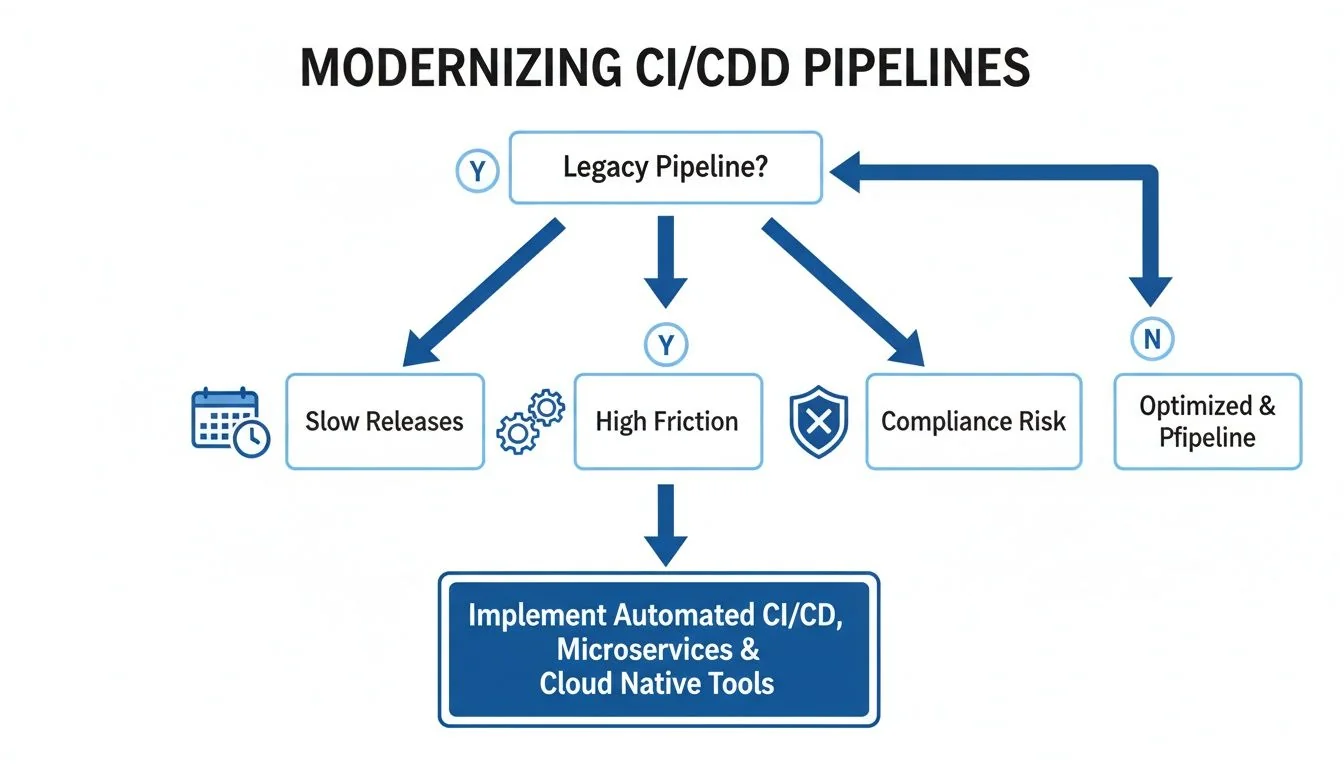
As the diagram shows, a legacy pipeline is a source of several failures at once.
A modern pipeline is a prerequisite for security and compliance. The inability to automatically produce a Software Bill of Materials (SBOM) or provide a clear audit trail for deployments is a significant business risk that can halt sales cycles and attract regulatory scrutiny.
Use this decision matrix to map common triggers to recommended actions and gauge whether you need to act now, start planning, or simply keep monitoring.
CI/CD Modernization Decision Matrix
| Trigger Category | High-Urgency Indicator (Modernize Now) | Medium-Urgency Indicator (Plan Modernization) | Low-Urgency Indicator (Maintain and Monitor) |
|---|---|---|---|
| Technical Performance | Build times >30 min; Frequent (>10%/week) pipeline failures requiring manual fix. | Builds take 15-30 min; Occasional manual interventions needed. | Builds are consistently <15 min; Pipeline is stable and reliable. |
| Release Velocity | Merge-to-deploy time is measured in weeks; Releases are a high-ceremony event. | Merge-to-deploy takes several days; Some manual steps slow down releases. | Merged code reaches production within hours or a day; Releases are routine. |
| Architectural Coupling | Deploying one service requires redeploying a monolith or multiple other services. | Some services are independently deployable, but dependencies still exist. | All services are independently testable and deployable without coordination. |
| Security & Compliance | Cannot produce an SBOM automatically; No clear, auditable deployment trail. | SBOM generation is manual and slow; Audit trails are difficult to assemble. | Automated SBOMs and clear audit logs are generated with every deployment. |
| Team Productivity | Engineers spend >15% of their time debugging or waiting on the pipeline. | Engineers express frustration with pipeline speed but are not fully blocked. | The pipeline is seen as a fast, reliable tool that accelerates work. |
| Business Impact | Inability to ship features is blocking key business initiatives or revenue goals. | Pipeline friction is a known drag on velocity but not yet a critical blocker. | The pipeline effectively supports the current pace of business and innovation. |
Use the matrix to build a data-backed case. High-urgency indicators justify acting now, while medium-urgency ones give you lead time to plan.
When Not to Modernize
A modernization strategy also defines when not to act. Putting resources into a system with a limited future is a poor use of capital.
Identify these "do not modernize" scenarios:
- Systems Scheduled for Decommissioning: If an application is slated for retirement within 12-18 months, the ROI on a pipeline overhaul is zero. Focus on stability and maintenance.
- Low-Impact, Stable Applications: For systems that are rarely updated and perform a stable, non-critical function, a clunky pipeline is "good enough." The cost of modernization outweighs any marginal benefit.
- Highly Specialized, Isolated Systems: Some applications have unique hardware or software dependencies that can’t be easily containerized or moved to cloud-native tools. The effort can be prohibitive, a common challenge in many legacy system modernization projects.
Core Modernization Patterns And Their Trade-Offs
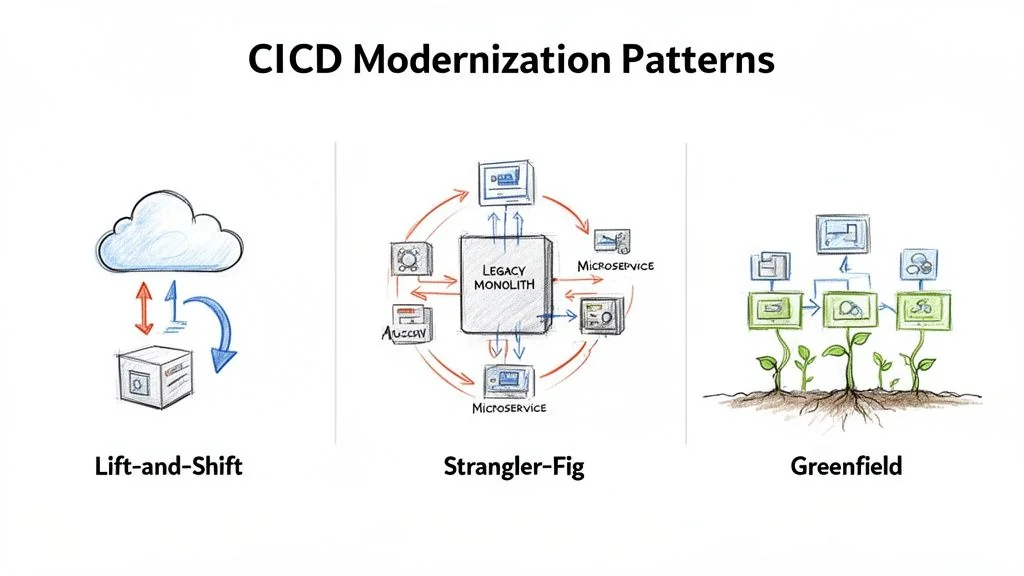
The implementation pattern is one of the biggest decisions in a CI/CD modernization project. A mismatch, such as attempting a ground-up rewrite for a stable but inefficient system, is a primary cause of failure. There are three core patterns, each with a different cost, risk, and timeline. The right choice depends on your application architecture, team skills, and business pressure.
Lift-And-Shift To Cloud-Native Tools
The Lift-and-Shift pattern is the fastest path. It involves migrating existing pipeline logic from a legacy system (like a self-hosted Jenkins server) to a modern, cloud-native tool like GitLab CI, GitHub Actions, or Azure DevOps with minimal changes to jobs and scripts. This approach works best when your pipelines are fundamentally sound but are held back by aging, self-managed infrastructure. The goal is speed and infrastructure relief, not architectural transformation.
- Typical Cost: Low, usually $50,000 - $150,000. The main costs are tool licensing and the initial migration effort.
- Realistic Timeline: Fast, typically 2-4 months. You are re-platforming existing logic, not reinventing it.
- Required Skillsets: DevOps engineers fluent in the target cloud-native platform with strong scripting skills (e.g., YAML, Bash).
- Risk Profile: Low. Because the core build logic does not change, the risk of introducing new functional bugs is minimal.
The downside of Lift-and-Shift is that it often just moves your problems to a new platform. If your build scripts are slow and brittle, moving them will not fix them. You have modernized the runner, not the build.
The Strangler-Fig Pattern For Phased Migration
The Strangler-Fig pattern is a risk-averse strategy for complex, monolithic pipelines. Instead of a big-bang replacement, you carve off pieces of the old pipeline and replace them with new, modernized services. For example, you might replace a manual testing stage with a fully automated test suite in a new tool. Over time, these new services "strangle" the old system until it can be shut down. This is the go-to method for high-risk systems where downtime is not an option.
- Typical Cost: Medium, ranging from $150,000 - $500,000+. Costs add up because you're running two systems in parallel and dedicating sustained engineering time to incremental refactoring.
- Realistic Timeline: Long, often 12-24 months. It requires sustained investment.
- Required Skillsets: A blended team of engineers who know the legacy system intimately, working alongside specialists in modern cloud-native architectures and tooling.
- Risk Profile: Low to Medium. Risk is managed by tackling one piece at a time. The real danger is project fatigue and the operational burden of managing a hybrid system.
Strangler-Fig execution demands deep expertise in both old and new technologies, a common requirement for effective DevOps integration modernization.
Greenfield Rewrite For New Services
The Greenfield pattern does not migrate a legacy pipeline at all. It builds a brand-new one from scratch for a new application, without technical debt, and lets you implement 10 CI/CD Pipeline Best Practices from day one. It is the default approach for any new product development and is impractical for modernizing a core legacy system unless you're also doing a complete application rewrite.
- Typical Cost: Varies with scope, but initial pipeline setup is often low ($25,000 - $75,000) and baked into the development budget.
- Realistic Timeline: Very fast for the pipeline itself, often 1-2 months.
- Required Skillsets: Strong cloud-native and "pipeline-as-code" expertise.
- Risk Profile: Low for the pipeline; high for the overall project. The pipeline is straightforward, but the new application it serves carries all the usual risks of new product development.
Calculating the True Cost and ROI of Modernization
A CI/CD modernization strategy depends on its business case. To get executive buy-in, build a financial model by calculating the total cost of ownership (TCO) and projecting a credible return on investment (ROI).
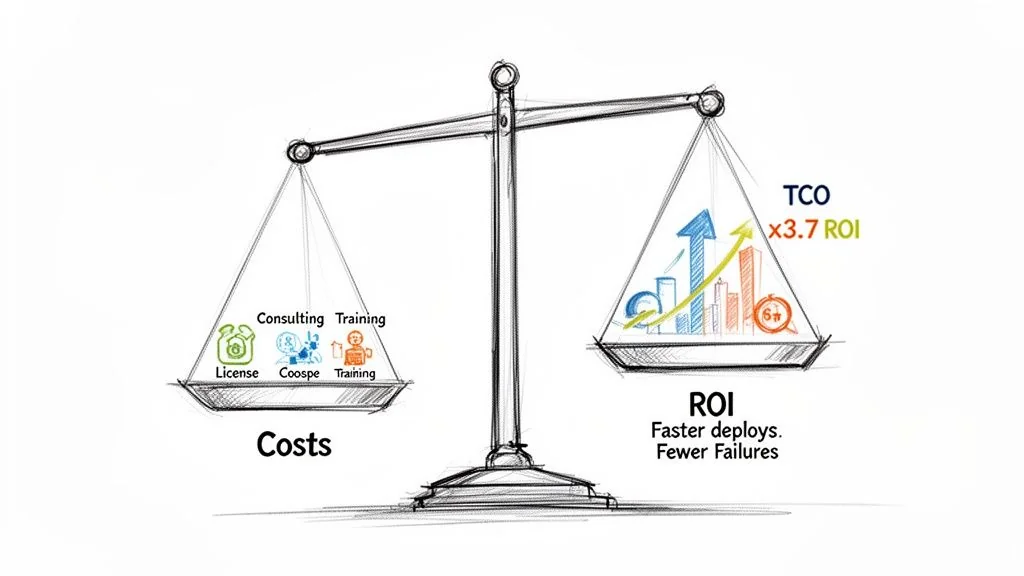
Focusing only on software licensing fees leads to an underfunded project. The real cost is a mix of direct expenses, hidden labor, and operational drag.
Deconstructing the Total Cost of Ownership
A complete TCO model for a pipeline migration includes several cost categories.
- Software and Infrastructure: This covers licensing for new tools (for example GitHub Enterprise, GitLab Ultimate, or CircleCI) and the cloud spend for build runners, storage, and networking.
- Implementation Partner Fees: For anything beyond a trivial migration, an expert partner is a required expense. These engagements typically run from $75,000 to $300,000+.
- Internal Engineering Hours: Your team's time is a direct cost, including all hours spent on planning, porting build scripts, testing, and troubleshooting.
- Retraining and Skill Development: Budget for formal training and certifications. This keeps your team from using the new tool just like the old one.
- Parallel Operations Overhead: During a phased rollout, you’re paying for both old and new infrastructure and taking on the operational load of managing a hybrid environment.
A common failure mode is underestimating the "soft costs" of internal engineering time and training. These often account for over 50% of the true TCO. Ignoring them leaves a budget detached from reality.
Modeling a Credible Return on Investment
The ROI calculation must connect directly to measurable business outcomes. The shift toward automated, cloud-native CI/CD delivers a clear financial upside. With 95% of new digital workloads now built using cloud-native methods, data shows this transition pays for itself: companies that implement modern, cloud-based data and CI/CD pipelines see a 3.7x return on investment.
To build your own ROI model, quantify improvements in a few key areas.
Key Metrics for Calculating ROI
-
Increased Deployment Frequency: If you move from monthly to daily deployments, you can react to market feedback faster, run more A/B tests, and accelerate your product roadmap. Assign a dollar value to that increased velocity.
-
Lower Change Failure Rate (CFR): A modern pipeline with solid automated testing slashes your CFR by 30-50%, directly reducing the cost of each incident.
-
Reduced Mean Time to Recovery (MTTR): Modern pipelines enable rapid, automated rollbacks. Cutting your MTTR from hours to minutes shrinks system downtime, which has a direct and quantifiable impact on revenue.
-
Reclaimed Engineering Hours: Calculate the time your team gets back from faster builds, less pipeline maintenance, and automated checks. These reclaimed hours can be reinvested into innovation and feature work.
By combining a transparent TCO analysis with an ROI model grounded in these metrics, attach dollar values to deployment frequency, change failure rate, MTTR, and reclaimed engineering hours before you ask for budget.
How to Navigate the Crowded CI/CD Tools Market
Choosing the right tool is a big decision, but rarely the most important one. The continuous integration tools market was valued at $802.2 million in 2021 and is projected to hit $4.38 billion by 2031. The full CI/CD market research report has the details. That growth leaves a basic choice: go all-in on an integrated platform, or assemble a custom, best-of-breed toolchain?
Integrated Platforms vs. Best-of-Breed Toolchains
An integrated platform, like GitLab or Azure DevOps, provides a single, unified solution for the entire development lifecycle. This path simplifies buying, reduces vendor management, and offers a consistent experience. It’s an attractive option for moving quickly without extensive integration work.
A best-of-breed toolchain picks the best tool for each specific job. Think GitHub for source control, CircleCI for builds, and Argo CD for GitOps deployments. This approach gives you maximum flexibility, but the trade-off is large: you own the complexity of integrating, managing, and securing every link in that chain.
The choice depends on what you value. Simplicity and standardization point to an integrated platform. Specialized tools for each team, at the cost of a higher operational burden, point to best-of-breed. Neither is right in general; pick the one that fits your culture and risk appetite.
Core Evaluation Criteria for Tool Selection
Look past feature lists to what will affect your security, scale, and long-term architecture.
- Ecosystem and Integration APIs: How well does the tool play with your existing systems like Jira, Slack, or your observability stack? A solid API is essential for building automation.
- Security and Compliance Features: How does the tool help secure your software supply chain? Look for built-in support for SAST, DAST, dependency scanning, and advanced features like signed builds or automated SBOM generation. This is the most important evaluation point in regulated industries.
- Scalability and Performance: Can this tool handle your future growth? Dig into its ability to scale build agents, manage hundreds of concurrent jobs, and support a large, distributed engineering org without becoming a bottleneck.
For a detailed look at how the leading platforms measure up against these criteria, see this CI/CD tools comparison.
The Overlooked Role of Implementation Partners
The partner you choose to implement the tool is often more important than the tool. This is especially true for messy legacy migrations, like moving from a heavily customized on-prem Jenkins setup to a cloud-native platform. Specialized partners bring domain expertise that can decide whether the project succeeds. A partner with a track record of migrating pipelines for financial services will already know the specific compliance and security traps that a generic consultant would stumble into. Vetting a partner should be just as rigorous as vetting the tool itself. Ask for case studies and talk to references. What you are buying is a proven ability to execute complex migrations.
Your 90-Day Action Plan for a Successful Modernization
A CI/CD modernization strategy is just a document until you execute it. This 90-day roadmap turns high-level decisions into action by starting small and proving value quickly, which secures buy-in for a full-scale rollout.
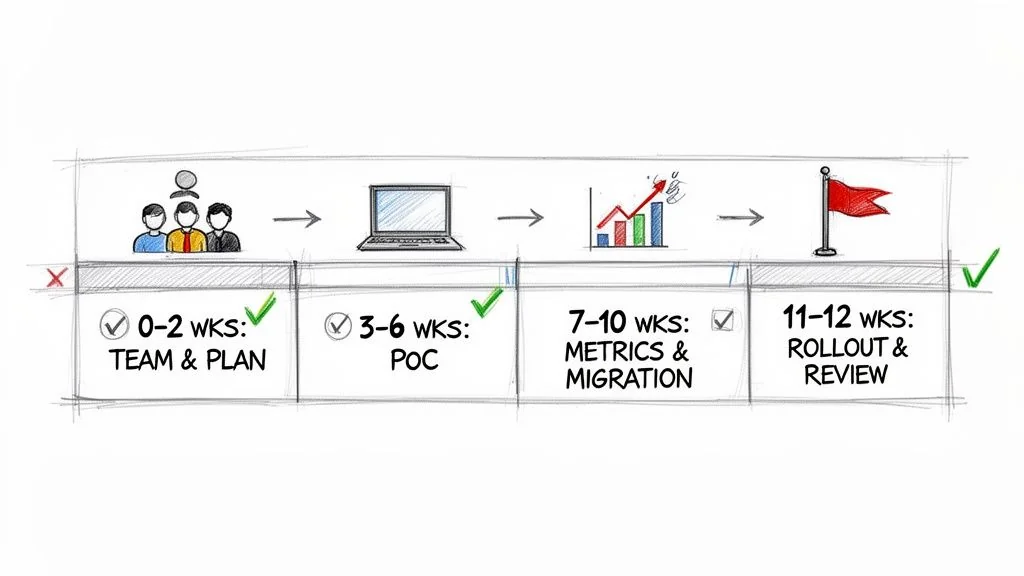
This timeline hinges on focusing on a single, high-impact application first. Proving success at this scale justifies a larger investment better than any presentation.
Phase 1: The First 30 Days
The first month is about groundwork and alignment. Your objective is a data-driven plan, finished before any code is touched.
- Assemble the Core Team (Week 1): Pull together a small, dedicated "tiger team" of 3-5 engineers. This group must include a senior DevOps specialist, a developer from the target application, and a project lead.
- Select the Proof-of-Concept (PoC) Application (Week 2): Pick one application to be your testbed. You're looking for a service that is high-impact but non-critical. The ideal candidate has obvious pipeline pain points but isn’t so complex that it will derail the PoC.
- Establish Baseline Metrics (Weeks 3-4): Before you change anything, document the current build times, deployment frequency, change failure rate, and mean time to recovery (MTTR) for the chosen application. These numbers are how you prove success later.
Phase 2: The Next 30 Days
This is where your team applies the modernization pattern you chose (like a Lift-and-Shift or Strangler-Fig) to the PoC application with your new toolchain.
Launch a PoC using your chosen tools and migration pattern. The goal is a functional pipeline that shows clear, measurable improvements over the legacy system, not a perfect one. This working model becomes your best communication tool.
By the end of this phase, you should have a new pipeline running in parallel with the old one, processing real builds and deployments in a non-production environment. This side-by-side setup allows for a direct comparison against the baseline metrics.
Phase 3: The Final 30 Days
The last month is about validation, communication, and planning your next move. It's time to turn your PoC's success into a repeatable playbook for the rest of the organization.
- Measure and Report (Weeks 9-10): Compare the new pipeline's performance against the baseline from Phase 1. A 40% reduction in build time or your first truly automated deployment to staging are the kind of concrete data points you need.
- Develop the Stakeholder Communication Plan (Week 11): Package your results into a clear business case. Show leadership the "before and after" to prove the ROI and build the political capital needed for a wider implementation.
- Finalize the Rollout Plan (Week 12): Use the lessons from the PoC to create a refined roadmap for the next batch of applications. This plan should include realistic timelines, updated budget estimates, and clear resource requirements.
Next Steps
A modernized CI/CD pipeline is a capability that enables faster, more secure software delivery, not the end goal. Your 90-day plan has proven the concept. Next, execute the broader rollout plan developed in Phase 3.
This involves:
- Securing the Full Budget: Use the ROI data from your PoC to secure the necessary funding for a full-scale migration across your portfolio of applications.
- Scaling the Team: Expand your core modernization team or establish a "Center of Excellence" to guide other teams and enforce best practices.
- Executing in Waves: Prioritize applications based on business impact and technical readiness, and tackle them in methodical, quarterly waves.
Chief Analyst, Software Modernization Intelligence · 10+ years B2B market research
Published: