
Your Guide to a CI/CD Pipeline Modernization Strategy
Modernizing your CI/CD pipeline is a hard-nosed business decision to stop bleeding money on legacy systems you can’t see on a P&L statement. The goal is to turn a slow, brittle delivery process into a competitive weapon by shipping faster, cutting developer friction, and slashing the time it takes to fix production failures. This isn’t about making engineers happy; it directly accelerates time-to-market and builds the system stability that protects revenue.
Framing a pipeline modernization project as a “technical upgrade” is a mistake. It’s a business case. An outdated pipeline is a massive, unmeasured cost center that grinds down developer productivity, stifles innovation, and quietly injects risk into your operations.
Why Your Legacy CI/CD Pipeline Is a Hidden Cost Center
The real expense isn’t the servers your old Jenkins instance is running on. It’s the opportunity cost of slow, manual, and unreliable software delivery. When a competitor can deploy features multiple times a day while you’re stuck on a weekly or monthly release cadence, you’re not just losing a speed race—you’re losing the ability to react to the market. Keeping a legacy pipeline on life support drains resources in ways that don’t show up on a balance sheet. The costs are buried in developer toil, painfully long incident resolutions, and a constant low-grade panic about compliance.
The True Expense of Inaction
When your engineers spend their days fighting brittle scripts, staring at progress bars, or manually pushing code to production, they aren’t building the next feature that drives revenue.
The real drag on your business is the accumulated friction. A 45-minute build time for a team of 50 engineers isn’t just a delay. It’s thousands of hours of lost productivity every year, translating directly into delayed projects and bloated operational costs.
This friction doesn’t just slow you down; it burns out your best people. Top engineers want to work with modern tools that get out of their way, not systems they have to constantly fight.
Quantifying the Hidden Costs
To get buy-in for a modernization strategy, you must speak the language of business by quantifying these hidden expenses with cold, hard metrics.
- Developer Friction: Calculate the time engineers waste on slow builds, flaky tests, and manual deployments. Slashing a build time from 45 minutes to 10 minutes can reclaim thousands of engineering hours a year. That’s a direct impact on your project capacity.
- Slow Release Cycles: Measure your deployment frequency and lead time for changes. If a critical bug fix takes a week to deploy, what’s the cost of that customer-facing downtime or security vulnerability? High-performing teams deploy on-demand, often multiple times per day.
- Prolonged Incident Resolution: Dig into your Mean Time to Recovery (MTTR). Old pipelines often lack the observability and automated rollback capabilities needed to fix issues fast. An MTTR of several hours versus a few minutes has a direct, measurable impact on revenue and customer trust.
- Mounting Compliance Risks: Manual compliance checks are a recipe for human error and audit failures. Modern pipelines automate security scanning (SAST, DAST), dependency checking, and the generation of audit evidence like SBOMs. Failing an audit or suffering a breach from an unpatched dependency carries a price tag that dwarfs the cost of any pipeline tool.
A Decision Framework for When to Modernize Your Pipeline
Deciding to modernize your CI/CD pipeline is a strategic intervention that must start with a brutally honest assessment: is our current pipeline an asset or a liability? The decision to act must be driven by specific, measurable pain points, not a vague desire for “better DevOps.” This framework provides a defensible tool to justify the strategy to both the board and your engineering teams with data, not just intuition.
Technical Debt and Architectural Bottlenecks
The first signs of trouble are always technical. If your engineers are constantly fighting the pipeline, it’s a clear signal that a change is long overdue.
Look for these high-urgency triggers:
- Slow Build and Test Cycles: When build times creep past 30 minutes, it’s a direct tax on developer productivity, crippling the feedback loop and encouraging engineers to batch changes, which only increases deployment risk.
- High Merge-to-Deploy Latency: If it takes days or even weeks for a merged pull request to reach production, your pipeline has failed its primary mission. This lag points to excessive manual handoffs, tangled dependencies, or a complete lack of automated release orchestration.
- Brittle and Unreliable Tooling: Frequent pipeline failures requiring manual intervention are a massive drain. When your engineers spend more time debugging the delivery process than writing code, the system is actively working against your business.
- Monolithic Release Dependencies: Your architecture and pipeline are fundamentally misaligned if deploying a single microservice requires rebuilding and redeploying an entire monolith. This tight coupling negates the main benefit of a microservices architecture: independent deployability.
Business Blockers and Compliance Failures
Technical friction always translates into business risk and blocked initiatives. A legacy pipeline can easily become the single point of failure preventing you from hitting strategic goals, especially in regulated industries.
The following flowchart shows how critical pipeline issues—like slow releases, high friction, and compliance gaps—create clear decision points for modernization.
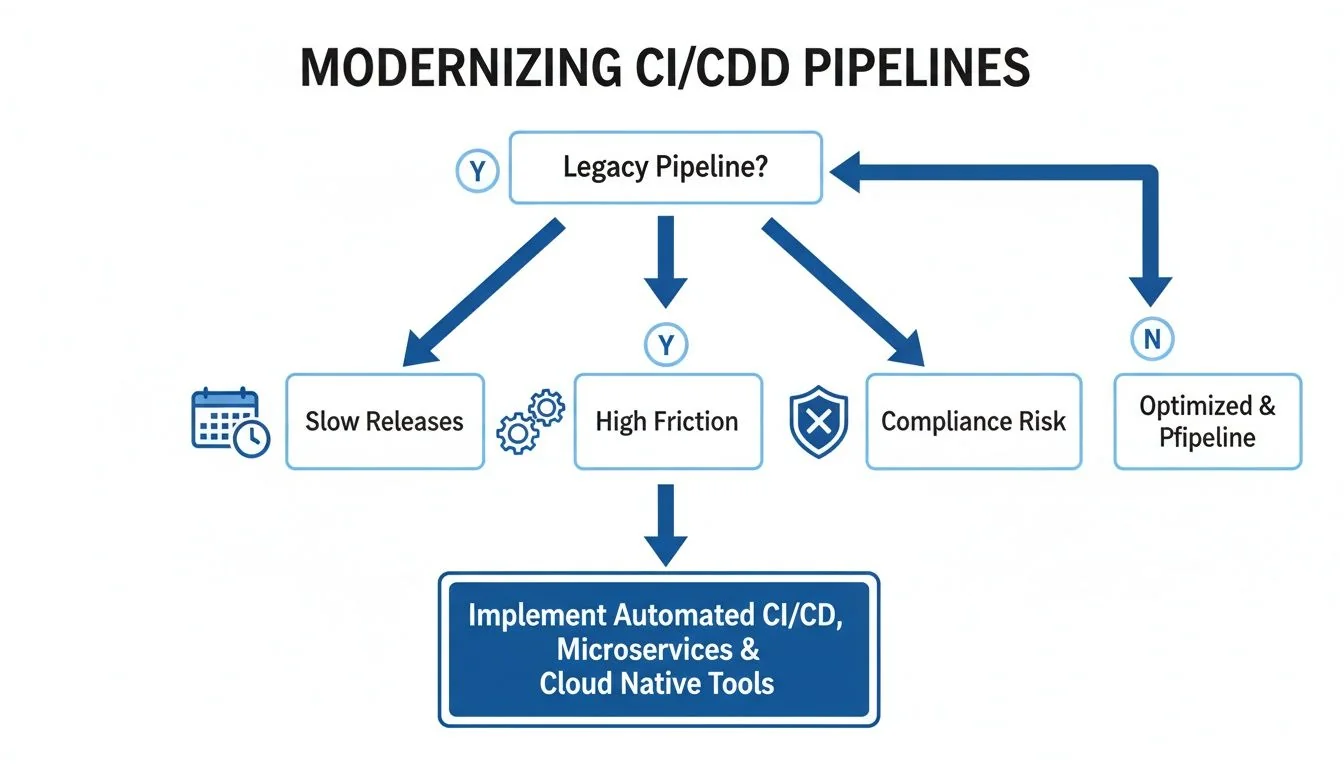
As the diagram shows, a legacy pipeline isn’t just one problem. It’s a source of multiple business-critical failures that demand a strategic response. Ignoring these signals means accepting lower velocity, higher operational risk, and potential non-compliance.
Key Takeaway: A modern pipeline is a prerequisite for security and compliance. The inability to automatically produce a Software Bill of Materials (SBOM) or provide a clear audit trail for deployments is a significant business risk that can halt sales cycles and attract regulatory scrutiny.
Use this decision matrix to map common triggers to recommended actions and gauge whether you need to act now, start planning, or simply keep monitoring.
CI/CD Modernization Decision Matrix
| Trigger Category | High-Urgency Indicator (Modernize Now) | Medium-Urgency Indicator (Plan Modernization) | Low-Urgency Indicator (Maintain and Monitor) |
|---|---|---|---|
| Technical Performance | Build times >30 min; Frequent (>10%/week) pipeline failures requiring manual fix. | Builds take 15-30 min; Occasional manual interventions needed. | Builds are consistently <15 min; Pipeline is stable and reliable. |
| Release Velocity | Merge-to-deploy time is measured in weeks; Releases are a high-ceremony event. | Merge-to-deploy takes several days; Some manual steps slow down releases. | Merged code reaches production within hours or a day; Releases are routine. |
| Architectural Coupling | Deploying one service requires redeploying a monolith or multiple other services. | Some services are independently deployable, but dependencies still exist. | All services are independently testable and deployable without coordination. |
| Security & Compliance | Cannot produce an SBOM automatically; No clear, auditable deployment trail. | SBOM generation is manual and slow; Audit trails are difficult to assemble. | Automated SBOMs and clear audit logs are generated with every deployment. |
| Team Productivity | Engineers spend >15% of their time debugging or waiting on the pipeline. | Engineers express frustration with pipeline speed but are not fully blocked. | The pipeline is seen as a fast, reliable tool that accelerates work. |
| Business Impact | Inability to ship features is blocking key business initiatives or revenue goals. | Pipeline friction is a known drag on velocity but not yet a critical blocker. | The pipeline effectively supports the current pace of business and innovation. |
This matrix is a tool for building a data-backed narrative. High-urgency indicators are your burning platform, while medium-urgency ones give you the lead time to build a proactive, strategic plan.
When Not to Modernize
A smart modernization strategy also defines when not to act. Pouring resources into a system with a limited future is a poor use of capital.
Identify these “do not modernize” scenarios:
- Systems Scheduled for Decommissioning: If an application is slated for retirement within 12-18 months, the ROI on a pipeline overhaul is zero. Focus on stability and maintenance.
- Low-Impact, Stable Applications: For systems that are rarely updated and perform a stable, non-critical function, a clunky pipeline is “good enough.” The cost of modernization outweighs any marginal benefit.
- Highly Specialized, Isolated Systems: Some applications have unique hardware or software dependencies that can’t be easily containerized or moved to cloud-native tools. The effort can be prohibitive, a common challenge in many legacy system modernization projects.
Ultimately, the decision to modernize is an economic one. Evaluating your pipeline against these clear technical and business triggers builds a solid, data-driven case for when and why to invest.
Core Modernization Patterns And Their Trade-Offs
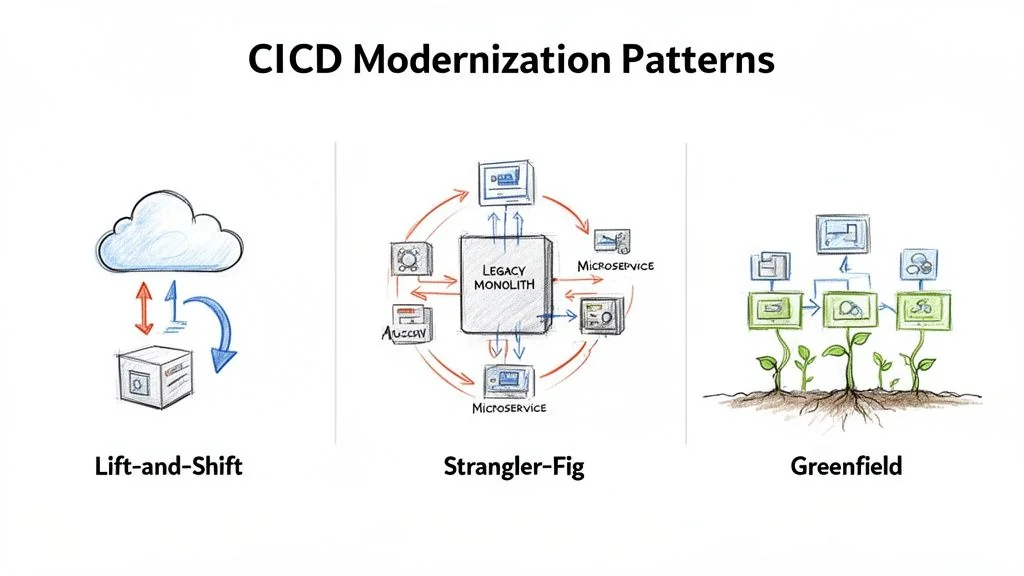
Choosing your implementation pattern is one of the most critical decisions in a CI/CD modernization project. A pattern mismatch—like attempting a ground-up rewrite for a stable but inefficient system—is a primary cause of failure. There are three core patterns, each with a different cost, risk, and timeline. The right choice depends on your application architecture, team skills, and business pressure.
Lift-And-Shift To Cloud-Native Tools
The Lift-and-Shift pattern is the fastest path from A to B. It involves migrating existing pipeline logic from a legacy system (like a self-hosted Jenkins server) to a modern, cloud-native tool like GitLab CI, GitHub Actions, or Azure DevOps with minimal changes to jobs and scripts. This approach works best when your pipelines are fundamentally sound but are hamstrung by creaky, self-managed infrastructure. The goal is speed and infrastructure relief, not architectural transformation.
- Typical Cost: Low, usually $50,000 - $150,000. The main costs are tool licensing and the initial migration effort.
- Realistic Timeline: Fast, typically 2-4 months. You are re-platforming existing logic, not reinventing it.
- Required Skillsets: DevOps engineers fluent in the target cloud-native platform with strong scripting skills (e.g., YAML, Bash).
- Risk Profile: Low. Because the core build logic does not change, the risk of introducing new functional bugs is minimal.
The critical downside of Lift-and-Shift is that it often just moves your problems to a nicer neighborhood. If your build scripts are slow and brittle, moving them to a new platform won’t magically fix them. You’ve modernized the runner, not the race.
The Strangler-Fig Pattern For Phased Migration
The Strangler-Fig pattern is a risk-averse strategy for complex, monolithic pipelines. Instead of a big-bang replacement, you surgically carve off pieces of the old pipeline and replace them with new, modernized services. For example, you might replace a manual testing stage with a fully automated test suite in a new tool. Over time, these new services “strangle” the old system until it can be shut down. This is the go-to method for high-risk systems where downtime is not an option.
- Typical Cost: Medium, ranging from $150,000 - $500,000+. Costs add up because you’re running two systems in parallel and dedicating sustained engineering time to incremental refactoring.
- Realistic Timeline: Long. This is a marathon, often taking 12-24 months. It requires patience and sustained investment.
- Required Skillsets: A blended team of engineers who know the legacy system intimately, working alongside specialists in modern cloud-native architectures and tooling.
- Risk Profile: Low to Medium. Risk is managed by tackling one piece at a time. The real danger is project fatigue and the operational headache of managing a hybrid system.
A successful Strangler-Fig execution demands deep expertise in both old and new technologies—a common requirement for effective DevOps integration modernization.
Greenfield Rewrite For New Services
The Greenfield pattern isn’t about migrating a legacy pipeline at all. It’s about building a brand-new one from scratch for a new application. This is the “perfect world” scenario where you’re unburdened by technical debt and can implement 10 CI/CD Pipeline Best Practices from day one. This is the default approach for any new product development and is impractical for modernizing a core legacy system unless you’re also doing a complete application rewrite.
- Typical Cost: Varies with scope, but initial pipeline setup is often low ($25,000 - $75,000) and baked into the development budget.
- Realistic Timeline: Very fast for the pipeline itself, often 1-2 months.
- Required Skillsets: Strong cloud-native and “pipeline-as-code” expertise.
- Risk Profile: Low for the pipeline; high for the overall project. The pipeline is straightforward, but the new application it serves carries all the usual risks of new product development.
Calculating the True Cost and ROI of Modernization
Any CI/CD modernization strategy lives or dies by its business case. To get executive buy-in, you must build a rock-solid financial model by calculating the total cost of ownership (TCO) and projecting a credible return on investment (ROI).
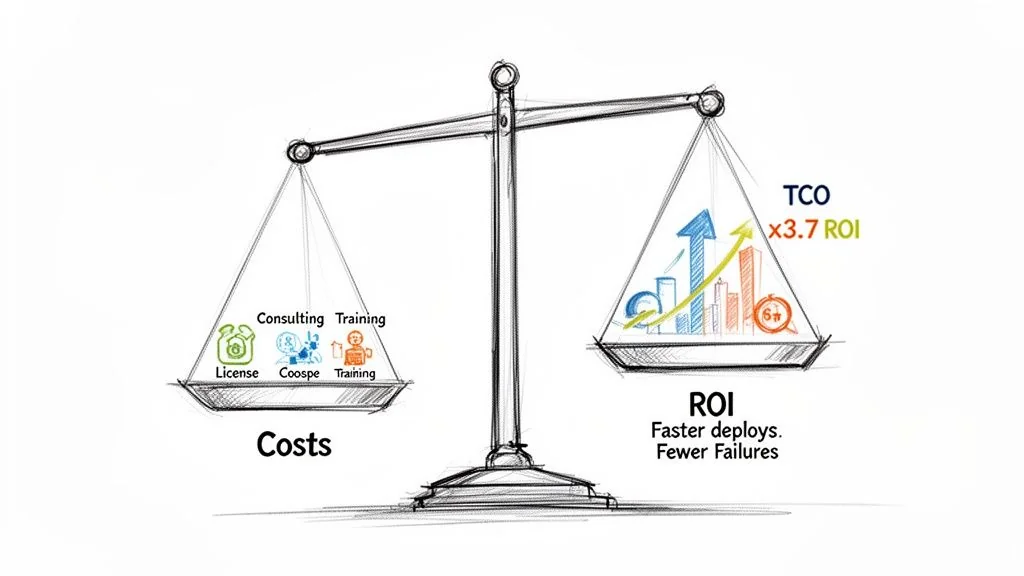
Focusing only on software licensing fees is a classic mistake that guarantees an underfunded project. The real cost is a mix of direct expenses, hidden labor, and operational drag.
Deconstructing the Total Cost of Ownership
A complete TCO model for a pipeline migration includes several cost categories.
- Software and Infrastructure: This covers licensing for new tools—think GitHub Enterprise, GitLab Ultimate, or CircleCI—and the cloud spend for build runners, storage, and networking.
- Implementation Partner Fees: For anything beyond a trivial migration, an expert partner is a non-negotiable expense. These engagements typically run from $75,000 to $300,000+.
- Internal Engineering Hours: Your team’s time isn’t free. This is a direct cost that includes all hours spent on planning, porting build scripts, testing, and troubleshooting.
- Retraining and Skill Development: Budget for formal training and certifications. This investment prevents your team from using the new tool just like the old one.
- Parallel Operations Overhead: During a phased rollout, you’re paying for both old and new infrastructure and taking on the operational load of managing a hybrid environment.
A common failure mode is underestimating the “soft costs” of internal engineering time and training. These often account for over 50% of the true TCO. Ignoring them leads to a budget that is detached from reality.
Modeling a Credible Return on Investment
The ROI calculation must connect directly to measurable business outcomes. The shift toward automated, cloud-native CI/CD delivers a clear financial upside. With 95% of new digital workloads now built using cloud-native methods, data shows this transition pays for itself—companies that implement modern, cloud-based data and CI/CD pipelines see a 3.7x return on investment. For a deeper dive into these numbers, you can explore the market analysis of CI/CD tools.
To build your own ROI model, quantify improvements in a few key areas.
Key Metrics for Calculating ROI
-
Increased Deployment Frequency: If you move from monthly to daily deployments, you can react to market feedback faster, run more A/B tests, and accelerate your product roadmap. Assign a dollar value to that increased velocity.
-
Lower Change Failure Rate (CFR): A modern pipeline with solid automated testing slashes your CFR by 30-50%, directly reducing the cost of each incident.
-
Reduced Mean Time to Recovery (MTTR): Modern pipelines enable rapid, automated rollbacks. Cutting your MTTR from hours to minutes shrinks system downtime, which has a direct and quantifiable impact on revenue.
-
Reclaimed Engineering Hours: Calculate the time your team gets back from faster builds, less pipeline maintenance, and automated checks. These reclaimed hours can be reinvested into innovation and feature work.
By combining a transparent TCO analysis with an ROI model grounded in these metrics, you transform your CI/CD modernization plan from a “tech project” into a compelling business investment.
How to Navigate the Crowded CI/CD Tools Market
Choosing the right tool is a big decision, but it’s rarely the most important one. The market is noisy, with the continuous integration tools market valued at $802.2 million in 2021 and projected to hit $4.38 billion by 2031. This explosion shows that modernizing pipelines is no longer optional. You can get a deeper look at these numbers in the full CI/CD market research report. This growth forces a fundamental choice: go all-in on an integrated platform, or assemble a custom, best-of-breed toolchain?
Integrated Platforms vs. Best-of-Breed Toolchains
An integrated platform, like GitLab or Azure DevOps, provides a single, unified solution for the entire development lifecycle. This path simplifies buying, cuts vendor management headaches, and offers a consistent experience. It’s an attractive option for moving quickly without extensive integration work.
A best-of-breed toolchain is about picking the absolute best tool for each specific job. Think GitHub for source control, CircleCI for builds, and Argo CD for GitOps deployments. This approach gives you maximum flexibility and power, but it comes with a major trade-off: you own the complexity of integrating, managing, and securing every link in that chain.
Your choice here is a direct reflection of your engineering philosophy. Do you value simplicity and standardization (integrated platform), or do you want to empower teams with specialized, top-tier tools, even if it means a higher operational burden (best-of-breed)? There’s no right answer—only the one that aligns with your culture and risk appetite.
Core Evaluation Criteria for Tool Selection
Move beyond simple feature lists and concentrate on what will directly impact your security, scale, and long-term architecture.
- Ecosystem and Integration APIs: How well does the tool play with your existing systems like Jira, Slack, or your observability stack? A robust API is essential for building automation.
- Security and Compliance Features: How does the tool help secure your software supply chain? Look for built-in support for SAST, DAST, dependency scanning, and advanced features like signed builds or automated SBOM generation. This is your most critical evaluation point in regulated industries.
- Scalability and Performance: Can this tool handle your future growth? Dig into its ability to scale build agents, manage hundreds of concurrent jobs, and support a large, distributed engineering org without becoming a bottleneck.
When it’s time to decide, a broad market overview can be a huge help. Check out our detailed CI/CD tools comparison to see how the leading platforms measure up against these criteria.
The Overlooked Role of Implementation Partners
The tool you pick is often less important than the partner you choose to help you implement it. This is especially true for messy legacy migrations, like moving from a heavily customized on-prem Jenkins setup to a cloud-native platform. Specialized partners bring deep domain expertise that can make or break the project. A partner with a track record of migrating pipelines for financial services will already know the specific compliance and security traps that a generic consultant would stumble into. Vetting a partner should be just as rigorous as vetting the tool itself. Ask for case studies and talk to references. A partner’s true value is in their proven ability to execute complex migrations.
Your 90-Day Action Plan for a Successful Modernization
A solid CI/CD modernization strategy is just a document until you execute. This 90-day roadmap is designed to translate high-level decisions into concrete action by starting small and proving value quickly to secure broader buy-in for a full-scale rollout.
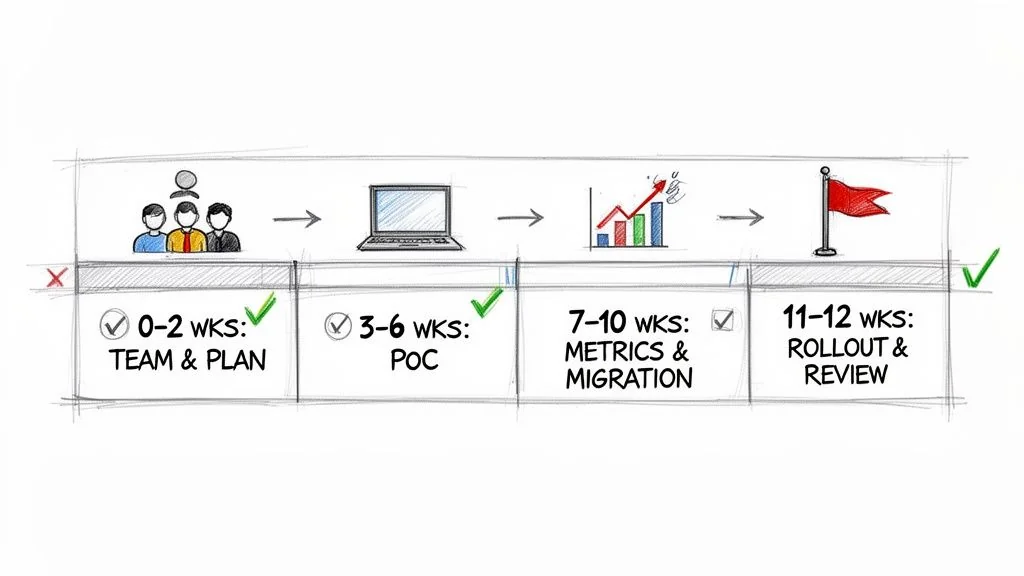
This timeline hinges on focusing on a single, high-impact application first. Proving success on this limited scale is far more effective for justifying a larger investment than any PowerPoint presentation.
Phase 1: The First 30 Days
The first month is about groundwork and alignment. Your objective is to create a bulletproof, data-driven plan before a single line of code is touched.
- Assemble the Core Team (Week 1): Pull together a small, dedicated “tiger team” of 3-5 engineers. This group must include a senior DevOps specialist, a developer from the target application, and a project lead.
- Select the Proof-of-Concept (PoC) Application (Week 2): Pick one application to be your testbed. You’re looking for a service that is high-impact but non-critical. The ideal candidate has obvious pipeline pain points but isn’t so complex that it will derail the PoC.
- Establish Baseline Metrics (Weeks 3-4): Before you change anything, document the current build times, deployment frequency, change failure rate, and mean time to recovery (MTTR) for the chosen application. These numbers are your ammunition for proving success.
Phase 2: The Next 30 Days
This is where your team applies the modernization pattern you chose (like a Lift-and-Shift or Strangler-Fig) to the PoC application with your new toolchain.
Key Action: Launch a PoC using your chosen tools and migration pattern. The goal here isn’t a perfect pipeline. It’s about getting a functional one running that demonstrates clear, measurable improvements over the legacy system. This working model becomes your most powerful communication tool.
By the end of this phase, you should have a new pipeline running in parallel with the old one, processing real builds and deployments in a non-production environment. This side-by-side setup allows for a direct comparison against the baseline metrics.
Phase 3: The Final 30 Days
The last month is about validation, communication, and planning your next move. It’s time to turn your PoC’s success into a repeatable playbook for the rest of the organization.
- Measure and Report (Weeks 9-10): Compare the new pipeline’s performance against the baseline from Phase 1. A 40% reduction in build time or your first truly automated deployment to staging are the kinds of powerful, concrete data points you need.
- Develop the Stakeholder Communication Plan (Week 11): Package your results into a clear business case. Show leadership the “before and after” to prove the ROI and build the political capital needed for a wider implementation.
- Finalize the Rollout Plan (Week 12): Use the lessons from the PoC to create a refined roadmap for the next batch of applications. This plan should include realistic timelines, updated budget estimates, and clear resource requirements.
Next Steps
A modernized CI/CD pipeline is not the end goal; it’s a foundational capability that enables faster, more secure software delivery. Your 90-day plan has proven the concept and built organizational momentum. Now, you must execute the broader rollout plan developed in Phase 3.
This involves:
- Securing the Full Budget: Use the ROI data from your PoC to secure the necessary funding for a full-scale migration across your portfolio of applications.
- Scaling the Team: Expand your core modernization team or establish a “Center of Excellence” to guide other teams and enforce best practices.
- Executing in Waves: Prioritize applications based on business impact and technical readiness, and tackle them in methodical, quarterly waves.
By treating pipeline modernization as a continuous, strategic initiative rather than a one-off project, you build a lasting competitive advantage.